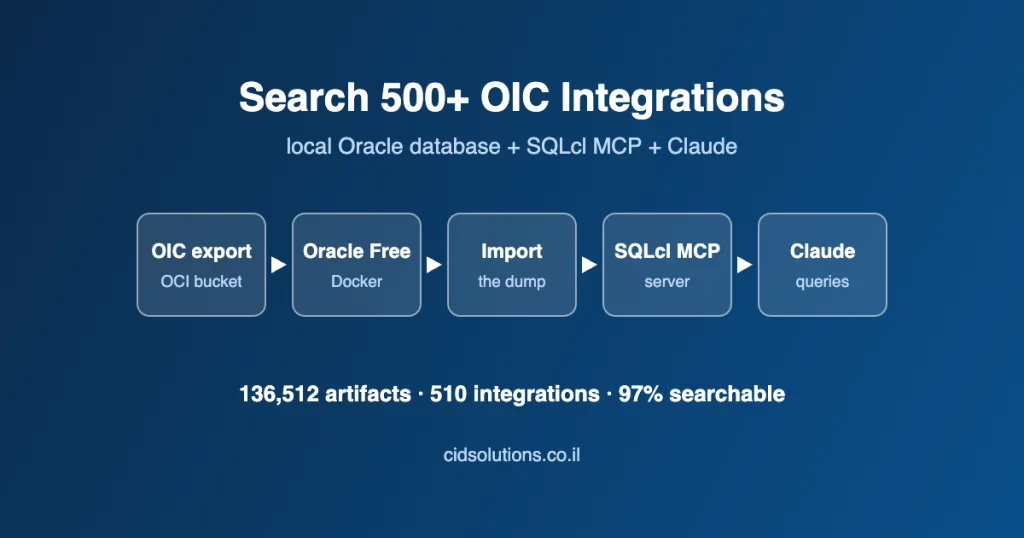
Difficulty: Intermediate. This guide shows how to search OIC integrations at scale: first restore the OIC export into a local Oracle database, then let Claude query it through the SQLcl MCP server.
TL;DR
Problem: a large enterprise runs more than 500 OIC integration flows under a single service user. Files in the document repository (UCM) kept disappearing, but nobody knew which flow was responsible. However, the OIC console gives you no practical way to search OIC integrations inside every mapping.
Finding: an OIC export is a set of Oracle database tables, so if you restore it into a throwaway local Oracle database and let an AI agent talk to it through the SQLcl MCP server, every mapping, WSDL, schema and expression file becomes searchable text.
Result: we located the 3 integrations that call UCM DELETE_DOC in minutes, identified the one flow that builds a very loose UCM search query, then repeated the same check on a newly exported version, and found unrelated defects along the way. This post shows the whole method, so you can repeat it: the setup, a map of what is inside the export, and every line of the code Claude generated.
1. The business challenge
The customer is a big enterprise organization with an OIC instance that grew over the years: more than 500 integrations, a mix of standalone integrations and projects, many of them with several versions kept side by side. In addition, every integration runs with the same service user.
Then the symptom appeared: random files were being deleted by that service user. Because it is one identity for everything, the audit trail on the document side says “the integration user did it” and nothing more. So the task was threefold: find the integrations that can delete documents, identify the exact spot in the flow that does it, and fix it.
Opening 500+ integrations one by one, and inside each one every mapping, is not a realistic plan, because the useful evidence lives deep inside: the UCM operation is a value in an XSLT mapping (IdcService="DELETE_DOC"), and the WSDL and XSD files are stored encoded, so even a text search over the raw tables finds nothing.
2. The idea: search OIC integrations by treating the export as a database
An OIC export contains the repository tables: objects (integrations, connections, lookups), containers (the Default pool and projects) and artifacts (mappings, adapter definitions, schemas, expression files). Once those tables sit in a database you can query them with SQL, and once an AI agent can run that SQL for you, you can ask questions in plain language and get answers with evidence.
The toolchain, end to end:
- Full export of the OIC instance into an OCI Object Storage bucket, and download of the dump file to a workstation.
- A fresh local Oracle database in Docker, using the excellent gvenzl/oracle-free image. Credit and thanks to Gerald Venzl for maintaining it, because one command gives you a working Oracle Database Free instance.
- Import of the dump into that container with Data Pump.
- SQLcl with the MCP server option, so an AI client can connect to the database through a saved connection.
- Claude analyzing the tables and building a search mechanism across every artifact in the export.
- Full integration analysis: which integration uses which connection, which operation, in which mapping.
- A coverage report that states what was searched and what was not, so you can trust “not found”.
- Mapping review of the suspicious flows, which also exposed bugs unrelated to the original problem.
- Re-checking a newer version straight from an exported
.iarfile, without touching the database.
3. Setting up the lab to search OIC integrations
3.1 A local Oracle database in Docker
Keep the password in an environment variable instead of typing it into commands. Also, the image reads ORACLE_PASSWORD, listens on 1521 and creates the pluggable database FREEPDB1 (see the image documentation for the details):
export ORACLE_PWD='<choose a password>'

docker run -d --name oic-scratch \
  -p 1521:1521 \
  -e ORACLE_PASSWORD="$ORACLE_PWD" \
  -v oic-scratch-data:/opt/oracle/oradata \
gvenzl/oracle-free:latest3.2 Import the dump
Copy the dump file into the container, create a directory object and a working schema, then import. Adapt the names to your export: the source schema name is inside the dump, and if the generated DDL points to a tablespace that does not exist in your container (ours pointed to DATA), remap it.
-- as a privileged user, connected to FREEPDB1
CREATE USER scratch IDENTIFIED BY "<password from your env variable>";
GRANT CREATE SESSION, CREATE TABLE, CREATE VIEW, CREATE PROCEDURE TO scratch;
ALTER USER scratch QUOTA UNLIMITED ON users;
CREATE DIRECTORY dump_dir AS '/tmp/dump';
GRANT READ, WRITE ON DIRECTORY dump_dir TO scratch;

# inside the container
impdp system@//localhost:1521/FREEPDB1 \
  directory=dump_dir dumpfile=oic_export.dmp \
  remap_schema=<source_schema>:SCRATCH \
remap_tablespace=DATA:USERSOne tip: after the import, trust SELECT COUNT(*) and not USER_TABLES.NUM_ROWS, because the optimizer statistics travel with the dump and had gone stale in our case (for example ICS_ARTIFACTS showed 135,355 rows in the statistics and 136,512 in reality).
3.3 Download and install SQLcl
SQLcl is Oracle’s command-line client for the database. In addition, it already includes the MCP server, so there is nothing else to install. Per the Oracle documentation, the MCP server needs SQLcl 25.2.0 or higher and Java 17 or higher. Once you install it, it becomes the bridge that lets an AI client search OIC integrations in your database.
- Check Java. Run
java -version. If it is older than 17, install a current JDK (on a Mac:brew install --cask temurin). - Download SQLcl from Oracle’s SQLcl page, oracle.com/database/sqldeveloper/technologies/sqlcl/download (the file is
sqlcl-latest.zip), and unzip it to a permanent folder, for example~/tools/sqlcl. The executable isbin/sql. - Or use Homebrew on a Mac:
brew install --cask sqlcl. Then locate the binary withwhich sql(you need its absolute path for the MCP configuration).
# manual install
unzip ~/Downloads/sqlcl-latest.zip -d ~/tools
~/tools/sqlcl/bin/sql -V          # prints the SQLcl version (must be 25.2.0 or higher)

# or with Homebrew
brew install --cask sqlcl
which sql3.4 Save a connection for the MCP server
The SQLcl MCP server works only with connections that you saved in advance (they live in the ~/.dbtools folder), and you must save the password with them, otherwise an MCP client cannot use the connection. In fact, the AI never sees the password; it only refers to the connection by name.
~/tools/sqlcl/bin/sql /nolog
SQL> conn -save scratch_dmp -savepwd scratch@//localhost:1521/FREEPDB1
Password? (**********?) ********
Name: scratch_dmp
Connect String: //localhost:1521/FREEPDB1
User: scratch
Password: ******
Connected.3.5 Configure Claude to search OIC integrations through MCP
The MCP client starts SQLcl with the -mcp option (see the Oracle guide to starting the SQLcl MCP server), so the whole configuration is the path to the binary plus that one argument. In Claude Desktop open Settings, Developer, Edit Config (the file is claude_desktop_config.json: on a Mac under ~/Library/Application Support/Claude/, on Windows under %APPDATA%\Claude\) and then add the server:
{
  "mcpServers": {
    "sqlcl": {
      "command": "/Users/<you>/tools/sqlcl/bin/sql",
      "args": ["-mcp"]
    }
  }
}Use the absolute path (the output of which sql if you installed with Homebrew), save the file, and restart Claude Desktop. After the restart, the sqlcl server should be listed as running.
With Claude Code (the command-line agent) the equivalent is one command:
claude mcp add sqlcl -- /Users/<you>/tools/sqlcl/bin/sql -mcpThen start a conversation and ask Claude to list the saved connections and connect to scratch_dmp. The server exposes these tools (as seen in our session):
The SQLcl MCP tools used in this project
3.6 Keep it safe
You are letting an AI write and run SQL, so apply the usual caution. Oracle’s documentation carries a security warning on exactly this, and it also points to the audit trail: the MCP server logs every statement it runs in the DBTOOLS$MCP_LOG table, and each statement carries a comment naming the model. Our rules for this lab:
- A dedicated scratch database and a dedicated user with only the privileges it needs (the grants above). The user owns only a copy of the export.
- No production credentials anywhere near the dump or the database, and no secrets in the prompts.
- Read the SQL the AI generates before you act on a finding, and cross-check important counts with an independent query.
4. What is inside an OIC export before you search OIC integrations
Before searching anything it is worth knowing what you are searching. Also, the dump we received contains 14 tables, of which 5 hold data in this export. Oracle does not publish this schema, so the descriptions below come from the column names and from the content we observed, and treat them as an aid for analysis, not as a reference of record. Knowing the layout is the first step to search OIC integrations reliably.
4.1 The tables
Tables in the dump. Nine of the fourteen are empty in this export, so the whole analysis rests on the first five.
4.2 What the objects in ICS_RESOURCE are
ICS_RESOURCE is the catalog. In addition, the column RESOURCE_TYPE tells you what each row is, and the content columns show a mixed storage format: most definitions are plain XML, but connection definitions come encoded.
1,846 objects in ICS_RESOURCE, by type
Objects reach their container through CONTAINER_ID: ICS_CONTAINER has one GLOBAL_POOL row (the Default pool, where standalone integrations live) and 21 PROJECTS rows.
4.3 ICS_ARTIFACTS: where the logic is
Everything that makes up an integration sits in ICS_ARTIFACTS. These are the columns that matter:
The useful columns of ICS_ARTIFACTS (26 in total, many are reserved FIELDn_FUTURE_USE columns)
4.4 The artifact catalog: what each type contains
After we classified every one of the 136,512 artifacts, the table below became the heart of the analysis: it tells you which artifact holds which kind of logic, how big it is, and how it is stored. Each type tells you where to look when you search OIC integrations for a specific string.
Supporting, binary and empty artifacts
All 136,512 artifacts, by type
4.5 Clear text, encoded and zipped: the storage formats you search in OIC integrations
The reason a plain LIKE or INSTR search over the export misses so much is that content comes in four formats. Reading them correctly is what the code in section 5 does, so keep these four formats in mind:
The four ways content is stored, and the one way to read each
4.6 A look at the clear-text files
Two files you will meet constantly. First expr.properties, the readable form of a condition (identifiers changed):
TextExpression : STATUS_CODE = 'REQUIRED'
XpathExpression : $orderHeader/ns1:G_ORDER/ns1:STATUS_CODE = 'REQUIRED'
NamespaceList : ns1=http://xmlns.oracle.com/cloud/adapter/...Second, stateinfo.json, which records which variables and functions a mapping touches:
{"referencedFunctionsWithTrackFlag":[],"version":2.0,"errorCount":0,
 "referencedLookupData":[],"warningCount":0,
 "variablesReferenced":[{"rootElement":"{http://www.oracle.com/UCM}Field",
"variableName":"loop_Field", ...}]}The second one is already a hint, because a stateinfo.json that references the {http://www.oracle.com/UCM} namespace belongs to a mapping that talks to UCM.
4.7 How the tables connect
Every artifact belongs to an object, and every object belongs to a container. Also, that chain is what turns a hit inside a file into a statement like “integration X, version Y, in project Z”:
ICS_ARTIFACTS.ICS_RESOURCE_ID  ->  ICS_RESOURCE.ICS_RESOURCE_ID
ICS_RESOURCE.CONTAINER_ID      ->  ICS_CONTAINER.CONTAINER_ID

-- a connection is linked to the integration versions that use it through
-- ICS_AppInstance_Reference artifacts (ICS_ARTIFACTS.ICS_RESOURCE_ID = the connection's id)The folder structure inside RESOURCE_PATH (resources/processor_N/..., resources/application_N/..., PROJECT-INF/...) is the same as inside an exported .iar file, so the method works on a single exported integration too, as shown in section 8.
5. The code Claude generated to search OIC integrations
We did not write the tooling by hand. Instead, we described the goal (“a tool I can use in this database to search for a string in all types of artifacts”), and Claude inspected the tables, worked out how the export stores each artifact type, and generated two scripts: art_parse_all.sql (parse everything once) and art_search_install.sql (the search toolkit). We show both here in full, in the order they run. In fact, the scripts are safe to re-run, because the parser only processes artifacts that have no status row yet. As a result, you get a toolkit to search OIC integrations that anyone on the team can reuse.
The privileges needed are modest: CREATE TABLE for the parser, plus CREATE PROCEDURE and CREATE VIEW for the search toolkit. Moreover, we hit ORA-01031 before granting them.
5.1 Step one: the parse tables
ART_PARSE keeps one status row for every artifact, while ART_TEXT keeps the decoded text of the base64+gzip artifacts (WSDL and XSD), so a normal text search can read them.
CREATE TABLE IF NOT EXISTS art_parse (
  pk_id           RAW(16) PRIMARY KEY,
  ics_resource_id NVARCHAR2(400),
  resource_type   VARCHAR2(200),
  ext             VARCHAR2(30),
  resource_path   VARCHAR2(2000),
  stored_bytes    NUMBER,
  enc             VARCHAR2(12),
  decoded_bytes   NUMBER,
  fmt             VARCHAR2(12),
  status          VARCHAR2(30),
  searchable      CHAR(1),
  error_msg       VARCHAR2(500),
  parsed_ts       TIMESTAMP DEFAULT SYSTIMESTAMP
);
CREATE TABLE IF NOT EXISTS art_text (pk_id RAW(16) PRIMARY KEY, txt CLOB); -- decoded text of base64+gzip artifacts (WSDL, XSD)The parser classifies every artifact into one of these statuses:
Parse statuses (ART_PARSE.STATUS)
5.2 Step two: decode base64 + gzip
WSDL and XSD content is a base64 string of a gzip stream, so the decoder reads it in 32,000-byte chunks (the limit of UTL_ENCODE), then inflates the result with UTL_COMPRESS. This block also declares the variables the main loop uses.
DECLARE
  c_max   CONSTANT PLS_INTEGER := 1000000;   -- max rows per run
  c_secs  CONSTANT NUMBER      := 1700;      -- wall-clock cap per run; just re-run to continue
  l_t0    NUMBER := DBMS_UTILITY.GET_TIME;
  l_n     PLS_INTEGER := 0;
  l_len   PLS_INTEGER; l_enc VARCHAR2(12); l_status VARCHAR2(30); l_fmt VARCHAR2(12); l_srch CHAR(1); l_err VARCHAR2(500);
  l_blob  BLOB; l_clob CLOB; l_dec NUMBER; l_ext VARCHAR2(30); l_head VARCHAR2(400); l_c1 VARCHAR2(1); l_x XMLTYPE; l_j PLS_INTEGER;
  l_so INTEGER; l_do INTEGER; l_lc INTEGER; l_w INTEGER;
  l_b64 RAW(4) := UTL_RAW.CAST_TO_RAW('H4sI');

  FUNCTION art_decode(p_content BLOB) RETURN BLOB IS
    l_len PLS_INTEGER := DBMS_LOB.GETLENGTH(p_content); l_pos PLS_INTEGER := 1; l_amt PLS_INTEGER;
    l_chunk RAW(32000); l_gz BLOB; l_out BLOB;
  BEGIN
    DBMS_LOB.CREATETEMPORARY(l_gz, TRUE);
    WHILE l_pos <= l_len LOOP
      l_amt := LEAST(32000, l_len-l_pos+1);
      l_chunk := UTL_ENCODE.BASE64_DECODE(DBMS_LOB.SUBSTR(p_content, l_amt, l_pos));
      DBMS_LOB.WRITEAPPEND(l_gz, UTL_RAW.LENGTH(l_chunk), l_chunk);
      l_pos := l_pos + l_amt;
    END LOOP;
    l_out := UTL_COMPRESS.LZ_UNCOMPRESS(l_gz);
    DBMS_LOB.FREETEMPORARY(l_gz);
    RETURN l_out;
END;5.3 Step three: classify and convert every artifact
The main loop visits every artifact that has no status row, decides what it is by looking at the bytes (the ZIP signature 504B, the Java serialization signature ACED0005, NUL bytes, a leading < or {), converts text to a CLOB, then validates XML and JSON, and records the result. In addition, it commits every 200 rows and stops after a time limit, so you simply run it again to continue.
BEGIN
  FOR r IN (SELECT a.pk_id, a.ics_resource_id, a.resource_type, a.resource_path, a.content
            FROM ics_artifacts a
            WHERE NOT EXISTS (SELECT 1 FROM art_parse p WHERE p.pk_id = a.pk_id)) LOOP
    EXIT WHEN l_n >= c_max OR (DBMS_UTILITY.GET_TIME - l_t0)/100 > c_secs;
    l_n := l_n + 1;
    l_status := NULL; l_fmt := NULL; l_srch := 'N'; l_err := NULL; l_dec := NULL; l_enc := 'PLAIN'; l_len := NULL;
    l_ext := LOWER(REGEXP_SUBSTR(r.resource_path, '\.([A-Za-z0-9]+)$', 1, 1, NULL, 1));
    BEGIN
      IF r.content IS NULL OR DBMS_LOB.GETLENGTH(r.content) = 0 THEN
        l_enc := 'NONE';
        l_status := CASE WHEN r.resource_type LIKE '%\_Reference' ESCAPE '\' THEN 'EMPTY_BY_DESIGN' ELSE 'NO_CONTENT' END;
      ELSE
        l_len := DBMS_LOB.GETLENGTH(r.content);
        IF DBMS_LOB.SUBSTR(r.content, 4, 1) = l_b64 THEN l_enc := 'BASE64_GZIP'; END IF;
        IF r.resource_type = 'APILIBRART_JARFILE' THEN
          l_status := 'BINARY'; l_fmt := 'JAR'; l_dec := l_len;
        ELSE
          BEGIN
            IF l_enc = 'BASE64_GZIP' THEN l_blob := art_decode(r.content); ELSE l_blob := r.content; END IF;
            l_dec := DBMS_LOB.GETLENGTH(l_blob);
          EXCEPTION WHEN OTHERS THEN
            l_status := 'DECODE_FAILED'; l_err := SUBSTR(SQLERRM,1,500);
          END;
          IF l_status IS NULL THEN
            IF l_dec = 0 THEN
              l_status := 'NO_CONTENT';
            ELSIF DBMS_LOB.SUBSTR(l_blob, 2, 1) = HEXTORAW('504B') THEN
              l_status := 'BINARY'; l_fmt := 'ZIP';
            ELSIF DBMS_LOB.SUBSTR(l_blob, 4, 1) = HEXTORAW('ACED0005') THEN
              l_status := 'BINARY'; l_fmt := 'JAVASER'; l_srch := 'R';   -- Java serialized object: raw-byte search only
            ELSIF DBMS_LOB.INSTR(l_blob, HEXTORAW('00')) > 0 THEN
              l_status := 'BINARY'; l_fmt := 'BIN';
            ELSE
              l_so := CASE WHEN DBMS_LOB.SUBSTR(l_blob, 3, 1) = HEXTORAW('EFBBBF') THEN 4 ELSE 1 END;  -- skip UTF-8 BOM
              l_do := 1; l_lc := DBMS_LOB.DEFAULT_LANG_CTX;
              DBMS_LOB.CREATETEMPORARY(l_clob, TRUE);
              DBMS_LOB.CONVERTTOCLOB(l_clob, l_blob, DBMS_LOB.LOBMAXSIZE, l_do, l_so, NLS_CHARSET_ID('AL32UTF8'), l_lc, l_w);
              l_head := LTRIM(DBMS_LOB.SUBSTR(l_clob, 60, 1), CHR(9)||CHR(10)||CHR(13)||' ');
              l_c1 := SUBSTR(l_head, 1, 1);
              l_srch := 'Y';
              IF l_ext = 'data' THEN   -- notification templates ({FROM_PARAM_1}, HTML fragments): text, not XML/JSON
                l_fmt := 'TEXT'; l_status := 'PARSED_TEXT';
              ELSIF l_c1 = '<' THEN
                l_fmt := 'XML';
                BEGIN l_x := XMLTYPE(l_clob); l_status := 'PARSED_OK'; l_x := NULL;
                EXCEPTION WHEN OTHERS THEN
                  IF SQLCODE = -64498 THEN l_status := 'PARSED_EXTREF'; ELSE l_status := 'PARSED_MALFORMED'; END IF;
                  l_err := SUBSTR(SQLERRM,1,500);
                END;
              ELSIF l_c1 IN ('{','[') THEN
                l_fmt := 'JSON';
                SELECT COUNT(*) INTO l_j FROM dual WHERE l_clob IS JSON;
                IF l_j = 1 THEN l_status := 'PARSED_OK'; ELSE l_status := 'PARSED_MALFORMED'; l_err := 'not valid JSON'; END IF;
              ELSIF l_head IS NULL THEN
                l_fmt := 'TEXT'; l_status := 'NO_CONTENT'; l_srch := 'N';
              ELSE
                l_fmt := 'TEXT'; l_status := 'PARSED_TEXT';
              END IF;
              IF l_enc = 'BASE64_GZIP' AND l_srch = 'Y' THEN
                INSERT INTO art_text (pk_id, txt) VALUES (r.pk_id, l_clob);
              END IF;
              DBMS_LOB.FREETEMPORARY(l_clob);
            END IF;
            IF l_enc = 'BASE64_GZIP' AND DBMS_LOB.ISTEMPORARY(l_blob) = 1 THEN DBMS_LOB.FREETEMPORARY(l_blob); END IF;
          END IF;
        END IF;
      END IF;
    EXCEPTION WHEN OTHERS THEN
      l_status := 'ERROR'; l_srch := 'N'; l_err := SUBSTR(SQLERRM,1,500);
    END;
    INSERT INTO art_parse (pk_id, ics_resource_id, resource_type, ext, resource_path, stored_bytes, enc, decoded_bytes, fmt, status, searchable, error_msg)
    VALUES (r.pk_id, r.ics_resource_id, r.resource_type, l_ext, r.resource_path, l_len, l_enc, l_dec, l_fmt, l_status, l_srch, l_err);
    IF MOD(l_n, 200) = 0 THEN COMMIT; END IF;
  END LOOP;
  COMMIT;
END;
/A bug we hit, and what it teaches. The first run failed with ORA-65512, “cannot access temporary LOB from old incarnation”. The cause was not the LOB: we had initialised the destination offset of
CONVERTTOCLOBtoLOBMAXSIZEinstead of1. The loop above has the fix, but the lesson is bigger: read the cause, not only the error number.
5.4 Step four: unzip the library JARs inside the database
OIC libraries are ZIP files. In fact, we did not need Java for this: the script reads the ZIP central directory, and for each entry that is deflated it puts a gzip header in front and the CRC and size behind, then lets UTL_COMPRESS inflate it, so the result is one row per file in ART_JAR_ENTRY. Because we unzip the libraries inside the database, the same procedure can search OIC integrations and their library code together.
CREATE TABLE IF NOT EXISTS art_jar_entry (
  pk_id RAW(16), jar_name VARCHAR2(400), integration VARCHAR2(400), entry_name VARCHAR2(1000),
  method NUMBER, comp_size NUMBER, uncomp_size NUMBER, kind VARCHAR2(10), content BLOB, txt CLOB, err VARCHAR2(500)
);
TRUNCATE TABLE art_jar_entry;

DECLARE
  l_jar BLOB; l_len PLS_INTEGER; l_eocd PLS_INTEGER; l_ents PLS_INTEGER; l_cd PLS_INTEGER; l_q PLS_INTEGER;
  l_p PLS_INTEGER; l_meth PLS_INTEGER; l_csz PLS_INTEGER; l_usz PLS_INTEGER; l_crc RAW(4); l_nl PLS_INTEGER; l_xl PLS_INTEGER; l_cl PLS_INTEGER; l_lo PLS_INTEGER;
  l_name VARCHAR2(1000); l_lnl PLS_INTEGER; l_lxl PLS_INTEGER; l_dpos PLS_INTEGER; l_data BLOB; l_gz BLOB; l_hdr RAW(10) := HEXTORAW('1F8B0800000000000000');
  l_kind VARCHAR2(10); l_clob CLOB; l_do INTEGER; l_so INTEGER; l_lc INTEGER; l_w INTEGER; l_err VARCHAR2(500);
  FUNCTION u16(p PLS_INTEGER) RETURN PLS_INTEGER IS BEGIN RETURN UTL_RAW.CAST_TO_BINARY_INTEGER(DBMS_LOB.SUBSTR(l_jar,2,p), UTL_RAW.LITTLE_ENDIAN); END;
  FUNCTION u32(p PLS_INTEGER) RETURN PLS_INTEGER IS BEGIN RETURN UTL_RAW.CAST_TO_BINARY_INTEGER(DBMS_LOB.SUBSTR(l_jar,4,p), UTL_RAW.LITTLE_ENDIAN); END;
BEGIN
  FOR j IN (SELECT a.pk_id, TO_CHAR(a.name) jar_name, TO_CHAR(r.name) integ, a.content
            FROM ics_artifacts a LEFT JOIN ics_resource r ON r.ics_resource_id = a.ics_resource_id
            WHERE a.resource_type = 'APILIBRART_JARFILE') LOOP
    l_jar := j.content; l_len := DBMS_LOB.GETLENGTH(l_jar);
    BEGIN
      l_eocd := NULL; l_q := l_len - 21 + 1;                       -- end-of-central-directory record
      WHILE l_q >= 1 AND l_q >= l_len - 70000 LOOP
        IF DBMS_LOB.SUBSTR(l_jar, 4, l_q) = HEXTORAW('504B0506') THEN l_eocd := l_q; EXIT; END IF;
        l_q := l_q - 1;
      END LOOP;
      IF l_eocd IS NULL THEN RAISE_APPLICATION_ERROR(-20010,'no EOCD'); END IF;
      l_ents := u16(l_eocd+10); l_cd := u32(l_eocd+16) + 1; l_p := l_cd;
      FOR e IN 1 .. l_ents LOOP
        l_err := NULL; l_clob := NULL; l_data := NULL; l_kind := NULL;
        l_meth := u16(l_p+10); l_crc := DBMS_LOB.SUBSTR(l_jar,4,l_p+16); l_csz := u32(l_p+20); l_usz := u32(l_p+24);
        l_nl := u16(l_p+28); l_xl := u16(l_p+30); l_cl := u16(l_p+32); l_lo := u32(l_p+42) + 1;
        l_name := UTL_RAW.CAST_TO_VARCHAR2(DBMS_LOB.SUBSTR(l_jar, l_nl, l_p+46));
        l_lnl := u16(l_lo+26); l_lxl := u16(l_lo+28); l_dpos := l_lo + 30 + l_lnl + l_lxl;
        IF SUBSTR(l_name, -1) = '/' THEN l_kind := 'DIR';
        ELSE
          BEGIN
            IF l_meth = 0 THEN l_data := DBMS_LOB.SUBSTR(l_jar, l_csz, l_dpos);
            ELSIF l_meth = 8 THEN
              DBMS_LOB.CREATETEMPORARY(l_gz, TRUE);
              DBMS_LOB.WRITEAPPEND(l_gz, 10, l_hdr);
              IF l_csz > 0 THEN DBMS_LOB.WRITEAPPEND(l_gz, l_csz, DBMS_LOB.SUBSTR(l_jar, l_csz, l_dpos)); END IF;
              DBMS_LOB.WRITEAPPEND(l_gz, 4, l_crc);
              DBMS_LOB.WRITEAPPEND(l_gz, 4, DBMS_LOB.SUBSTR(l_jar, 4, l_p+24));
              l_data := UTL_COMPRESS.LZ_UNCOMPRESS(l_gz);
              DBMS_LOB.FREETEMPORARY(l_gz);
            ELSE l_err := 'unsupported method ' || l_meth; END IF;
          EXCEPTION WHEN OTHERS THEN l_err := SUBSTR(SQLERRM,1,500); END;
          IF l_data IS NOT NULL THEN
            IF DBMS_LOB.SUBSTR(l_data,4,1) = HEXTORAW('CAFEBABE') THEN l_kind := 'CLASS';   -- compiled Java (none found in this tenant)
            ELSIF DBMS_LOB.INSTR(l_data, HEXTORAW('00')) > 0 THEN l_kind := 'BIN';
            ELSE
              l_kind := 'TEXT'; l_do := 1; l_so := 1; l_lc := DBMS_LOB.DEFAULT_LANG_CTX;
              DBMS_LOB.CREATETEMPORARY(l_clob, TRUE);
              DBMS_LOB.CONVERTTOCLOB(l_clob, l_data, DBMS_LOB.LOBMAXSIZE, l_do, l_so, NLS_CHARSET_ID('AL32UTF8'), l_lc, l_w);
            END IF;
          ELSE l_kind := 'ERR'; END IF;
        END IF;
        INSERT INTO art_jar_entry (pk_id, jar_name, integration, entry_name, method, comp_size, uncomp_size, kind, content, txt, err)
        VALUES (j.pk_id, j.jar_name, j.integ, l_name, l_meth, l_csz, l_usz, l_kind, l_data, l_clob, l_err);
        l_p := l_p + 46 + l_nl + l_xl + l_cl;
      END LOOP;
    EXCEPTION WHEN OTHERS THEN
      l_err := SUBSTR(SQLERRM,1,500);
      INSERT INTO art_jar_entry (pk_id, jar_name, integration, kind, err) VALUES (j.pk_id, j.jar_name, j.integ, 'ERR', l_err);
    END;
  END LOOP;
  COMMIT;
END;
/
UPDATE art_parse SET status = 'PARSED_OK', fmt = 'ZIP+JS', searchable = 'J' WHERE fmt = 'JAR';
COMMIT;The answer to “are the Java classes standard Java that we should decompile?” is that there were none to decompile, because all 46 jars contain one JavaScript file each and no .class files (the check for the CAFEBABE class signature is in the code above).
5.5 Step five: the coverage report
Four queries answer “what was parsed, and what is left?” The first must show zero unprocessed rows. Moreover, the last lists everything that is not searchable as text.
SELECT (SELECT COUNT(*) FROM ics_artifacts) artifacts,
       (SELECT COUNT(*) FROM art_parse)     processed,
       (SELECT COUNT(*) FROM ics_artifacts a WHERE NOT EXISTS (SELECT 1 FROM art_parse p WHERE p.pk_id=a.pk_id)) not_yet_processed
FROM dual;

-- 2) parsed vs left, by status
SELECT status, searchable, COUNT(*) n, ROUND(100*RATIO_TO_REPORT(COUNT(*)) OVER (),1) pct
FROM art_parse GROUP BY status, searchable ORDER BY n DESC;

-- 3) by type and status
SELECT NVL(resource_type,'(none)') resource_type, status, COUNT(*) n FROM art_parse GROUP BY resource_type, status ORDER BY 1, 3 DESC;

-- 4) everything that is NOT searchable (the "what is left" list)
SELECT status, resource_type, fmt, ext, resource_path, stored_bytes, error_msg
FROM art_parse WHERE searchable NOT IN ('Y','J') AND status <> 'EMPTY_BY_DESIGN' ORDER BY status, resource_type, resource_path;5.6 Step six: helper functions
The search toolkit starts with its own copy of the decoder, shown above, plus two small helpers: art_clob converts a BLOB of UTF-8 text to a CLOB (and skips a byte-order mark), and art_get_text returns any artifact as readable text, whether it was decoded in advance or not.
CREATE OR REPLACE FUNCTION art_clob(p_blob BLOB) RETURN CLOB IS
  l_c  CLOB;
  l_do INTEGER := 1;
  l_so INTEGER := 1;
  l_lc INTEGER := DBMS_LOB.DEFAULT_LANG_CTX;
  l_w  INTEGER;
BEGIN
  IF p_blob IS NULL THEN RETURN NULL; END IF;
  IF DBMS_LOB.SUBSTR(p_blob, 3, 1) = HEXTORAW('EFBBBF') THEN l_so := 4; END IF;   -- skip UTF-8 BOM
  DBMS_LOB.CREATETEMPORARY(l_c, TRUE);
  DBMS_LOB.CONVERTTOCLOB(l_c, p_blob, DBMS_LOB.LOBMAXSIZE, l_do, l_so, NLS_CHARSET_ID('AL32UTF8'), l_lc, l_w);
  RETURN l_c;
END art_clob;
CREATE OR REPLACE FUNCTION art_get_text(p_artifact_pk RAW) RETURN CLOB IS
l_b BLOB;
l_d BLOB;
l_c CLOB;
BEGIN
BEGIN
SELECT txt INTO l_c FROM art_text WHERE pk_id = p_artifact_pk;
RETURN l_c;
EXCEPTION WHEN NO_DATA_FOUND THEN NULL;
END;
SELECT content INTO l_b FROM ics_artifacts WHERE pk_id = p_artifact_pk;
l_d := art_decode(l_b);
l_c := art_clob(l_d);
RETURN l_c;
END art_get_text;5.7 Step seven: a hits table and views
Every search run writes its hits to ART_SEARCH_HITS under a run id, so you can compare runs later. Also, the views join artifacts to integration, version and project so that results are readable.
CREATE TABLE IF NOT EXISTS art_search_hits (
  run_id           NUMBER        NOT NULL,
  run_ts           TIMESTAMP     DEFAULT SYSTIMESTAMP,
  search_term      VARCHAR2(400),
  case_sensitive   CHAR(1),
  source           VARCHAR2(40),
  project          VARCHAR2(400),
  integration_name VARCHAR2(400),
  integration_code VARCHAR2(400),
  version          VARCHAR2(50),
  persisted_state  VARCHAR2(150),
  artifact_type    VARCHAR2(200),
  artifact_path    VARCHAR2(2000),
  enc              VARCHAR2(20),
  hit_no           NUMBER,
  position         NUMBER,
  snippet          VARCHAR2(1000)
);
CREATE OR REPLACE VIEW art_catalog_v AS
SELECT a.pk_id AS artifact_pk,
TO_CHAR(c.name) AS project,
c.container_id,
TO_CHAR(r.name) AS integration_name,
TO_CHAR(r.code) AS integration_code,
r.version,
r.persisted_state,
r.resource_type AS integration_type,
a.resource_type AS artifact_type,
a.resource_path AS artifact_path,
TO_CHAR(a.name) AS artifact_name,
p.status AS parse_status,
p.fmt AS format,
p.searchable,
DBMS_LOB.GETLENGTH(a.content) AS stored_bytes
FROM ics_artifacts a
LEFT JOIN art_parse p ON p.pk_id = a.pk_id
LEFT JOIN ics_resource r ON r.ics_resource_id = a.ics_resource_id
LEFT JOIN ics_container c ON c.container_id = r.container_id;CREATE OR REPLACE VIEW art_search_runs_v AS
SELECT run_id, run_ts, search_term, case_sensitive, snippet AS run_info
FROM art_search_hits
WHERE source = 'SUMMARY'
ORDER BY run_id DESC;
CREATE OR REPLACE VIEW art_search_last_v AS
SELECT run_id, search_term, source, project, integration_name, integration_code, version, persisted_state,
artifact_type, artifact_path, enc, hit_no, position, snippet
FROM art_search_hits
WHERE run_id = (SELECT MAX(run_id) FROM art_search_hits)
AND source <> 'SUMMARY'
ORDER BY project, integration_name, version, artifact_path, hit_no;
CREATE OR REPLACE VIEW art_search_by_integration_v AS
SELECT project, integration_name, integration_code, version, persisted_state,
COUNT(*) AS hits,
LISTAGG(DISTINCT artifact_type, ', ') WITHIN GROUP (ORDER BY artifact_type) AS artifact_types
FROM art_search_hits
WHERE run_id = (SELECT MAX(run_id) FROM art_search_hits)
AND source <> 'SUMMARY'
GROUP BY project, integration_name, integration_code, version, persisted_state
ORDER BY project, integration_name, version;5.8 Step eight: the procedure that lets you search OIC integrations
art_search is the tool you call. In addition, it searches the plain artifacts in place, the decoded WSDL and XSD, the unzipped library JavaScript, and the definition columns of the other tables. Parameters: the search term (at least 3 characters), case sensitivity, an optional list of artifact types, the maximum hits recorded per artifact, and switches for the other tables and the libraries. In short, it is the single entry point to search OIC integrations across every artifact type.
First the signature, the declarations and the helper that writes a hit with its integration, version and project:
CREATE OR REPLACE PROCEDURE art_search(
  p_term             IN VARCHAR2,
  p_case_sensitive   IN VARCHAR2 DEFAULT 'Y',    -- 'Y' exact case (fast), 'N' ignore case
  p_types            IN VARCHAR2 DEFAULT NULL,   -- comma list of artifact RESOURCE_TYPE (e.g. 'XSLT,JCA'); NULL = all
  p_max_per_artifact IN PLS_INTEGER DEFAULT 5,   -- max hits recorded per artifact
  p_other_tables     IN VARCHAR2 DEFAULT 'Y',    -- also search ICS_RESOURCE / ICS_CONTAINER / ICS_SCHEDULE_PARAMS
  p_jars             IN VARCHAR2 DEFAULT 'Y'     -- also search the library JavaScript (ART_JAR_ENTRY)
) IS
  l_cs     CHAR(1) := UPPER(SUBSTR(NVL(p_case_sensitive, 'Y'), 1, 1));
  l_run    NUMBER;
  l_raw    RAW(2000);
  l_low    CLOB;
  l_clob   CLOB;
  l_pos    PLS_INTEGER;
  l_start  PLS_INTEGER;
  l_snip   VARCHAR2(1000);
  l_err    PLS_INTEGER := 0;
  l_rows   PLS_INTEGER := 0;
  l_n      PLS_INTEGER;
  l_hits   PLS_INTEGER := 0;
  l_other  PLS_INTEGER := 0;
  l_proj   VARCHAR2(400);
  l_iname  VARCHAR2(400);
  l_icode  VARCHAR2(400);
  l_ver    VARCHAR2(50);
  l_state  VARCHAR2(150);
  l_tl     VARCHAR2(4000);                       -- normalised type list: ',XSLT,JCA,'

  PROCEDURE add_hit(p_source VARCHAR2, p_id VARCHAR2, p_type VARCHAR2, p_path VARCHAR2, p_enc VARCHAR2,
                    p_n NUMBER, p_p NUMBER, p_s VARCHAR2) IS
  BEGIN
    BEGIN
      SELECT TO_CHAR(c.name), TO_CHAR(rs.name), TO_CHAR(rs.code), rs.version, rs.persisted_state
        INTO l_proj, l_iname, l_icode, l_ver, l_state
        FROM ics_resource rs LEFT JOIN ics_container c ON c.container_id = rs.container_id
       WHERE rs.ics_resource_id = p_id;
    EXCEPTION WHEN NO_DATA_FOUND THEN
      l_proj := NULL; l_iname := NULL; l_icode := NULL; l_ver := NULL; l_state := NULL;
    END;
    INSERT INTO art_search_hits (run_id, search_term, case_sensitive, source, project, integration_name,
                                 integration_code, version, persisted_state, artifact_type, artifact_path,
                                 enc, hit_no, position, snippet)
    VALUES (l_run, p_term, l_cs, p_source, l_proj, l_iname, l_icode, l_ver, l_state, p_type, p_path,
            p_enc, p_n, p_p, SUBSTR(REGEXP_REPLACE(p_s, '[[:space:]]+', ' '), 1, 1000));
    l_hits := l_hits + 1;
END add_hit;Next, two helpers find the positions of the term, one for a BLOB (exact case, raw bytes) and one for a CLOB (exact or ignore case):
  -- hits inside a BLOB, exact case (raw byte match)
  PROCEDURE hits_blob(p_source VARCHAR2, p_id VARCHAR2, p_type VARCHAR2, p_path VARCHAR2, p_enc VARCHAR2, p_blob BLOB) IS
    l_s PLS_INTEGER := 1;
    l_p PLS_INTEGER;
  BEGIN
    FOR i IN 1 .. p_max_per_artifact LOOP
      l_p := DBMS_LOB.INSTR(p_blob, l_raw, l_s);
      EXIT WHEN l_p = 0;
      add_hit(p_source, p_id, p_type, p_path, p_enc, i, l_p,
              UTL_RAW.CAST_TO_VARCHAR2(DBMS_LOB.SUBSTR(p_blob, 300, GREATEST(l_p - 100, 1))));
      l_s := l_p + UTL_RAW.LENGTH(l_raw);
    END LOOP;
  END hits_blob;

  -- hits inside a CLOB (exact or ignore case)
  PROCEDURE hits_clob(p_source VARCHAR2, p_id VARCHAR2, p_type VARCHAR2, p_path VARCHAR2, p_enc VARCHAR2, p_c CLOB) IS
    l_s   PLS_INTEGER := 1;
    l_p   PLS_INTEGER;
    l_lw  CLOB;
  BEGIN
    IF l_cs = 'N' THEN l_lw := LOWER(p_c); END IF;
    FOR i IN 1 .. p_max_per_artifact LOOP
      IF l_cs = 'Y' THEN l_p := DBMS_LOB.INSTR(p_c, p_term, l_s);
      ELSE               l_p := DBMS_LOB.INSTR(l_lw, LOWER(p_term), l_s);
      END IF;
      EXIT WHEN l_p = 0;
      add_hit(p_source, p_id, p_type, p_path, p_enc, i, l_p, DBMS_LOB.SUBSTR(p_c, 300, GREATEST(l_p - 100, 1)));
      l_s := l_p + LENGTH(p_term);
    END LOOP;
END hits_clob;Then the body validates the input and opens a run:
BEGIN
  IF p_term IS NULL OR LENGTH(p_term) < 3 THEN
    RAISE_APPLICATION_ERROR(-20001, 'Search term must be at least 3 characters.');
  END IF;
  IF l_cs NOT IN ('Y', 'N') THEN
    RAISE_APPLICATION_ERROR(-20002, 'p_case_sensitive must be Y or N.');
  END IF;
  l_raw := UTL_RAW.CAST_TO_RAW(p_term);
  l_tl  := CASE WHEN p_types IS NULL THEN NULL ELSE ',' || UPPER(REPLACE(p_types, ' ', '')) || ',' END;
SELECT NVL(MAX(run_id), 0) + 1 INTO l_run FROM art_search_hits;Search source 1 is the plain-text artifacts. When you search with exact case, the match is a raw byte search in place, which is fast. With ignore case, however, the procedure converts each artifact to a CLOB first, which is slower:
  -- 1) plain-text artifacts, searched in place (XSLT, JCA, XML, JSON, properties, serialized maps ...)
  SELECT COUNT(*) INTO l_n FROM art_parse p
   WHERE p.enc = 'PLAIN' AND p.searchable IN ('Y', 'R')
     AND (l_tl IS NULL OR INSTR(l_tl, ',' || UPPER(NVL(p.resource_type, '(NULL)')) || ',') > 0);
  l_rows := l_rows + l_n;
  IF l_cs = 'Y' THEN
    FOR r IN (SELECT p.ics_resource_id, NVL(p.resource_type, '(NULL)') rtype, p.resource_path, a.content
              FROM   art_parse p JOIN ics_artifacts a ON a.pk_id = p.pk_id
              WHERE  p.enc = 'PLAIN' AND p.searchable IN ('Y', 'R')
              AND    (l_tl IS NULL OR INSTR(l_tl, ',' || UPPER(NVL(p.resource_type, '(NULL)')) || ',') > 0)
              AND    DBMS_LOB.INSTR(a.content, l_raw) > 0) LOOP
      BEGIN
        hits_blob('ICS_ARTIFACTS', r.ics_resource_id, r.rtype, r.resource_path, 'PLAIN', r.content);
      EXCEPTION WHEN OTHERS THEN l_err := l_err + 1; END;
    END LOOP;
  ELSE
    FOR r IN (SELECT p.ics_resource_id, NVL(p.resource_type, '(NULL)') rtype, p.resource_path, a.content
              FROM   art_parse p JOIN ics_artifacts a ON a.pk_id = p.pk_id
              WHERE  p.enc = 'PLAIN' AND p.searchable = 'Y'
              AND    (l_tl IS NULL OR INSTR(l_tl, ',' || UPPER(NVL(p.resource_type, '(NULL)')) || ',') > 0)) LOOP
      BEGIN
        l_clob := art_clob(r.content);
        hits_clob('ICS_ARTIFACTS', r.ics_resource_id, r.rtype, r.resource_path, 'PLAIN', l_clob);
        DBMS_LOB.FREETEMPORARY(l_clob);
      EXCEPTION WHEN OTHERS THEN l_err := l_err + 1; END;
    END LOOP;
END IF;After that, search source 2 is the decoded WSDL and XSD held in ART_TEXT, and source 3 is the library JavaScript:
  -- 2) decoded base64+gzip artifacts (WSDL, XMLSchema) from ART_TEXT
  SELECT COUNT(*) INTO l_n FROM art_text t JOIN art_parse p ON p.pk_id = t.pk_id
   WHERE (l_tl IS NULL OR INSTR(l_tl, ',' || UPPER(NVL(p.resource_type, '(NULL)')) || ',') > 0);
  l_rows := l_rows + l_n;
  FOR r IN (SELECT p.ics_resource_id, NVL(p.resource_type, '(NULL)') rtype, p.resource_path, t.txt
            FROM   art_text t JOIN art_parse p ON p.pk_id = t.pk_id
            WHERE  (l_tl IS NULL OR INSTR(l_tl, ',' || UPPER(NVL(p.resource_type, '(NULL)')) || ',') > 0)
            AND    ((l_cs = 'Y' AND DBMS_LOB.INSTR(t.txt, p_term) > 0)
                 OR (l_cs = 'N' AND DBMS_LOB.INSTR(LOWER(t.txt), LOWER(p_term)) > 0))) LOOP
    BEGIN
      hits_clob('ICS_ARTIFACTS', r.ics_resource_id, r.rtype, r.resource_path, 'BASE64_GZIP', r.txt);
    EXCEPTION WHEN OTHERS THEN l_err := l_err + 1; END;
  END LOOP;

  -- 3) library JavaScript (unzipped JARs)
  IF UPPER(NVL(p_jars, 'Y')) = 'Y'
     AND (l_tl IS NULL OR INSTR(l_tl, ',APILIBRART_JARFILE,') > 0) THEN
    SELECT COUNT(*) INTO l_n FROM art_jar_entry e WHERE e.txt IS NOT NULL;
    l_rows := l_rows + l_n;
    FOR r IN (SELECT p.ics_resource_id, e.jar_name || ' :: ' || e.entry_name entry_path, e.txt
              FROM   art_jar_entry e JOIN art_parse p ON p.pk_id = e.pk_id
              WHERE  e.txt IS NOT NULL
              AND    ((l_cs = 'Y' AND DBMS_LOB.INSTR(e.txt, p_term) > 0)
                   OR (l_cs = 'N' AND DBMS_LOB.INSTR(LOWER(e.txt), LOWER(p_term)) > 0))) LOOP
      BEGIN
        hits_clob('LIBRARY_JS', r.ics_resource_id, 'APILIBRART_JARFILE', r.entry_path, 'ZIP+JS', r.txt);
      EXCEPTION WHEN OTHERS THEN l_err := l_err + 1; END;
    END LOOP;
END IF;Finally, search source 4 is the definition columns of the other tables, done set-based in four statements:
  -- 4) other tables that can hold flow text (set-based)
  IF UPPER(NVL(p_other_tables, 'Y')) = 'Y' THEN
    INSERT INTO art_search_hits (run_id, search_term, case_sensitive, source, project, integration_name, integration_code,
                                 version, persisted_state, artifact_type, enc, hit_no, position, snippet)
    SELECT l_run, p_term, l_cs, 'ICS_RESOURCE.CONTENT', TO_CHAR(c.name), TO_CHAR(x.name), TO_CHAR(x.code), x.version,
           x.persisted_state, x.resource_type, 'CLOB', 1, x.pos,
           SUBSTR(REGEXP_REPLACE(DBMS_LOB.SUBSTR(x.content, 300, GREATEST(x.pos - 100, 1)), '[[:space:]]+', ' '), 1, 1000)
    FROM  (SELECT rs.*, DBMS_LOB.INSTR(CASE WHEN l_cs = 'Y' THEN rs.content ELSE LOWER(rs.content) END,
                                       CASE WHEN l_cs = 'Y' THEN p_term ELSE LOWER(p_term) END) pos
           FROM   ics_resource rs WHERE rs.content IS NOT NULL) x
    LEFT  JOIN ics_container c ON c.container_id = x.container_id
    WHERE  x.pos > 0;
    l_other := l_other + SQL%ROWCOUNT;

    INSERT INTO art_search_hits (run_id, search_term, case_sensitive, source, project, integration_name, integration_code,
                                 version, persisted_state, artifact_type, enc, hit_no, position, snippet)
    SELECT l_run, p_term, l_cs, 'ICS_RESOURCE.RESOURCE_OBJECT', TO_CHAR(c.name), TO_CHAR(x.name), TO_CHAR(x.code), x.version,
           x.persisted_state, x.resource_type, 'BLOB', 1, x.pos,
           SUBSTR(REGEXP_REPLACE(UTL_RAW.CAST_TO_VARCHAR2(DBMS_LOB.SUBSTR(x.resource_object, 300, GREATEST(x.pos - 100, 1))),
                                 '[[:space:]]+', ' '), 1, 1000)
    FROM  (SELECT rs.*,
                  CASE WHEN l_cs = 'Y' THEN DBMS_LOB.INSTR(rs.resource_object, UTL_RAW.CAST_TO_RAW(p_term))
                       ELSE GREATEST(DBMS_LOB.INSTR(rs.resource_object, UTL_RAW.CAST_TO_RAW(p_term)),
                                     DBMS_LOB.INSTR(rs.resource_object, UTL_RAW.CAST_TO_RAW(UPPER(p_term))),
                                     DBMS_LOB.INSTR(rs.resource_object, UTL_RAW.CAST_TO_RAW(LOWER(p_term)))) END pos
           FROM   ics_resource rs WHERE rs.resource_object IS NOT NULL) x
    LEFT  JOIN ics_container c ON c.container_id = x.container_id
    WHERE  x.pos > 0;
    l_other := l_other + SQL%ROWCOUNT;

    INSERT INTO art_search_hits (run_id, search_term, case_sensitive, source, project, artifact_type, enc, hit_no, position, snippet)
    SELECT l_run, p_term, l_cs, 'ICS_CONTAINER.CONTENT', TO_CHAR(x.name), x.container_type, 'CLOB', 1, x.pos,
           SUBSTR(REGEXP_REPLACE(DBMS_LOB.SUBSTR(x.content, 300, GREATEST(x.pos - 100, 1)), '[[:space:]]+', ' '), 1, 1000)
    FROM  (SELECT k.*, DBMS_LOB.INSTR(CASE WHEN l_cs = 'Y' THEN k.content ELSE LOWER(k.content) END,
                                      CASE WHEN l_cs = 'Y' THEN p_term ELSE LOWER(p_term) END) pos
           FROM   ics_container k WHERE k.content IS NOT NULL) x
    WHERE  x.pos > 0;
    l_other := l_other + SQL%ROWCOUNT;

    INSERT INTO art_search_hits (run_id, search_term, case_sensitive, source, project, integration_name, integration_code,
                                 version, artifact_type, artifact_path, enc, hit_no, position, snippet)
    SELECT l_run, p_term, l_cs, 'ICS_SCHEDULE_PARAMS', TO_CHAR(c.name), TO_CHAR(x.flow_code), TO_CHAR(x.flow_code),
           TO_CHAR(x.flow_version), 'SCHEDULE_PARAM', TO_CHAR(x.schedule_name) || '/' || TO_CHAR(x.param_name), 'CLOB', 1, x.pos,
           SUBSTR(REGEXP_REPLACE(DBMS_LOB.SUBSTR(x.param_value, 300, GREATEST(x.pos - 100, 1)), '[[:space:]]+', ' '), 1, 1000)
    FROM  (SELECT sp.*, DBMS_LOB.INSTR(CASE WHEN l_cs = 'Y' THEN sp.param_value ELSE LOWER(sp.param_value) END,
                                       CASE WHEN l_cs = 'Y' THEN p_term ELSE LOWER(p_term) END) pos
           FROM   ics_schedule_params sp WHERE sp.param_value IS NOT NULL) x
    LEFT  JOIN ics_container c ON c.container_id = x.container_id
    WHERE  x.pos > 0;
    l_other := l_other + SQL%ROWCOUNT;
END IF;Once the search is done, the procedure writes a summary row and prints the run id and counts:
  INSERT INTO art_search_hits (run_id, search_term, case_sensitive, source, snippet)
  VALUES (l_run, p_term, l_cs, 'SUMMARY',
          'types=' || NVL(p_types, 'ALL') || ' artifacts_scanned=' || l_rows || ' artifact_hits=' || l_hits ||
          ' other_table_hits=' || l_other || ' errors=' || l_err);
  COMMIT;
  DBMS_OUTPUT.PUT_LINE('run_id=' || l_run || '  artifacts_scanned=' || l_rows || '  artifact_hits=' || l_hits ||
                       '  other_table_hits=' || l_other || '  errors=' || l_err);
END art_search;
/5.9 How to use it to search OIC integrations
SET SERVEROUTPUT ON
EXEC art_search('DELETE_DOC');                         -- exact case, everything (seconds)
EXEC art_search('delete_doc', 'N');                    -- ignore case (slower)
EXEC art_search('delete_doc', 'N', 'XSLT,JCA');        -- ignore case, limited to artifact types
EXEC art_search('GenericSoapPort', 'Y', 'WSDL');       -- decoded WSDL/XSD come from ART_TEXT
EXEC art_search('IdcService', 'Y', NULL, 20);          -- up to 20 hits per artifact

SELECT * FROM art_search_last_v;                       -- hits of the most recent run, with snippets
SELECT * FROM art_search_by_integration_v;             -- one row per integration and version
SELECT * FROM art_search_runs_v;                       -- history of runs
SELECT * FROM art_catalog_v WHERE integration_name LIKE '%Import%';   -- browse artifacts with parse status
SELECT art_get_text(artifact_pk) FROM art_catalog_v WHERE artifact_path LIKE '%req_0d3f65%'; -- read one artifactBesides the procedure, the same script contains a one-shot query across all searchable records:
SELECT p.resource_type, p.status, p.resource_path, r.name integration, r.version, c.name project
FROM   art_parse p
JOIN   ics_artifacts a ON a.pk_id = p.pk_id
LEFT   JOIN ics_resource r  ON r.ics_resource_id = p.ics_resource_id
LEFT   JOIN ics_container c ON c.container_id = r.container_id
WHERE  p.searchable IN ('Y','R') AND p.enc = 'PLAIN'   -- ('J' jars are covered by the ART_JAR_ENTRY branch below)
AND    DBMS_LOB.INSTR(a.content, UTL_RAW.CAST_TO_RAW('&term')) > 0
UNION ALL
SELECT p.resource_type, p.status, p.resource_path, r.name, r.version, c.name
FROM   art_parse p
JOIN   art_text t ON t.pk_id = p.pk_id
LEFT   JOIN ics_resource r  ON r.ics_resource_id = p.ics_resource_id
LEFT   JOIN ics_container c ON c.container_id = r.container_id
WHERE  DBMS_LOB.INSTR(t.txt, '&term') > 0
UNION ALL
SELECT 'LIBRARY_JS', e.kind, e.jar_name || ' :: ' || e.entry_name, e.integration, NULL, NULL
FROM   art_jar_entry e
WHERE e.txt IS NOT NULL AND DBMS_LOB.INSTR(e.txt, '&term') > 0;6. The coverage report: what you can and cannot search in OIC integrations
This is the part we recommend not skipping, because searching is only as good as what you can prove was searched. A complete report is what makes it safe to search OIC integrations and trust a negative result. Here is what we checked:
Parse coverage
Because you know exactly which 3% is not text-searchable, and why, you can say “this string does not exist in the instance” with confidence.
7. Search OIC integrations: the full analysis and the finding
With the model in place, questions that used to be impossible became one-line prompts:
- How many integrations do we really have? 510 distinct integrations (330 standalone and 180 inside 20 projects), stored as 830 versions, 401 of them with an activated version.
- Where do we call UCM
DELETE_DOC? 3 activated integrations, 4 mapping files. - Which integrations use the UCM connection at all? 13, across 33 integration-version references.
- Which of them search UCM with the loosest operator,
<substring>, inside the query text? One.
That last one is the pattern worth a closer look. In fact, the mapping builds the UCM GET_SEARCH_RESULTS request like this (identifiers anonymized):
<Service IdcService="GET_SEARCH_RESULTS">
  <Document>
    <Field name="QueryText">
<xsl:value-of select="concat('dDocTitle <substring> `', $input/ID, '`')"/>A substring match on a document title is as permissive as UCM searching gets. If the value that goes into it is empty, short or not unique, the search returns more documents than the author intended, and the same integration also contains a DELETE_DOC step. Combine a permissive query with a delete, run it under a shared service user, and then “random files disappear” stops being mysterious. Where the delete takes its document ids from, and what protects it from a broad result set, is what the mapping review confirms.
The recommended fix pattern: search by an exact, unique key (an exact-match operator on a dedicated field, instead of a substring of the title), fail the flow when the key is empty, and verify the result count and the matched document names before the flow issues any delete.
8. Checking a newer version: analyze an .iar directly
The database is a snapshot. When you produce a new version of the integration, you do not need a new export of the whole instance: the .iar file you export from OIC is a ZIP archive. Once you unzip it, the same artifacts are there as plain files (the folder layout matches RESOURCE_PATH from section 4.3): the project descriptor, the XSLT mappings, the JCA and WSDL files, the connection references. In the exported archive the WSDL and XSD files are plain text, so no decoding is needed.
Then we handed the archive of the newer version to Claude and asked the same question. Moreover, a search across all of its mappings answered whether the permissive query was still there, which UCM operations the version calls, and how it differs from the version in the database. Same method, no import. That way you can search OIC integrations in a new version without a full instance export.
9. Reviewing mappings after you search OIC integrations
Once we had isolated the suspicious flows, the AI could read their mappings, connection references and adapter definitions side by side and explain what each step really does. Also, a review that takes a developer hours of clicking through the designer took minutes, and it surfaced a few defects that were unrelated to the deletion problem and that nobody had noticed. That is the quiet benefit of this approach: you set out to answer one question and end up with a reviewed codebase. In addition, this is the second benefit once you can search OIC integrations: you also get a review of what they do.
Prompts that worked
- “Create a tool I can use in this database to search for a string in all types of artifacts.”
- “Analyze all artifacts, create a process that searches every single record, and prepare a report of what was parsed successfully and what is left.”
- “Let’s also analyze the libraries. For Java, can we convert binary classes to Java and search across? Are they standard classes or the result of the integration definition?”
- “Find all integrations that use the UCM connection and perform a search with a substring inside a parameter. Show only the list, as an HTML table, with the element that does it.”
- “Does this issue also exist in the new version? Analyze this export in addition to the database.”
Gotchas and honest limitations
- Text search cannot see runtime values. If code builds a service name or a query dynamically, no static search will find it. Treat “not found” as strong evidence instead of proof, and keep the coverage report next to the result.
- Connection definitions are a separate corner. The 236 connection objects store their definition in
ICS_RESOURCE.CONTENTas base64 + gzip, outsideICS_ARTIFACTS. Our parser coversICS_ARTIFACTS, so the decoded connection definitions are not part of the text search. Connection usage is still fully answerable through the reference artifacts. If you need to search inside the connection definitions themselves, decode that column too. - It is a snapshot. The export reflects the instance as it was when we took it. Re-export when you need the current state.
- Mind the data. An OIC export holds your integration logic, endpoints and business text, so treat it as sensitive. When an AI agent runs queries against it, the client sends the results to the model. Check what your export contains, use a scratch database with a least-privilege user, never keep secrets in it, and follow your organization’s policy before pointing any AI client at customer material.
- Review what the AI writes. We verified the counts against independent queries (for example, we cross-checked the search for
DELETE_DOCwith a targeted query). Do the same before you act on a finding. - Small tool-specific surprises. SQLcl treats
&as a substitution character, so a search for an escaped<needsCHR(38); with auto-commit on, SQLcl may print “Commit Failed ORA-17273” after DML that was in fact applied; and you should start a long search asynchronously and poll for the result.
Takeaways for anyone who has to search OIC integrations
- The OIC console exists to design integrations, but it does not help you audit hundreds of them. To search OIC integrations at scale, put the export in a database: that is what databases do best.
- With SQLcl MCP, an AI agent can explore an unfamiliar schema, discover how artifacts are encoded and build the tooling itself, so the investigation starts in minutes instead of days.
- The same approach works for any “where do we use X” question: a deprecated endpoint, a hard-coded host before a P2T clone, a connection about to be retired, an operation you need to audit.
Related reading
- Download files from UCM with a PowerShell script driven by a CSV: handy once you know which documents are involved.
- OIC business event filters that validate but never fire: another OIC behavior that is hard to see from the designer.
- Passwordless BI Publisher connections in OIC: a security improvement for service-user integrations.
Have an OIC instance nobody dares to touch, or a mystery that the logs cannot explain? Reach out at info@cidsolutions.co.il or WhatsApp. Let’s get it solved. In fact, we help teams search OIC integrations, review them and fix what they find.
- TL;DR
- 1. The business challenge
- 2. The idea: search OIC integrations by treating the export as a database
- 3. Setting up the lab to search OIC integrations
- 4. What is inside an OIC export before you search OIC integrations
- 5. The code Claude generated to search OIC integrations
- 6. The coverage report: what you can and cannot search in OIC integrations
- 7. Search OIC integrations: the full analysis and the finding
- 8. Checking a newer version: analyze an .iar directly
- 9. Reviewing mappings after you search OIC integrations
- Prompts that worked
- Gotchas and honest limitations
- Takeaways for anyone who has to search OIC integrations
- Related reading