Difficulty: Intermediate
TL;DR
- Problem: With Fusion 26C, BI Publisher started enforcing a new SQL injection validation on data models. Uploading the CID Fusion Query BI Publisher package (
CidUtils.xdrz) through/xmlpserverbegan failing with a generic “Upload Failed”. - Root cause: our RunSQL data model used
DBMS_SQLto pre-parse queries for friendly error messages. BI Publisher now rejects any data model that referencesDBMS_SQLwith “SQLInjection Error: DML / DDL Operations not allowed”. - Fix: CID Fusion Query 3.3.0 ships a rewritten,
DBMS_SQL-free data model that returns errors as a result row instead. - Action required: update the extension (Chrome does it automatically) and re-upload
CidUtils.xdrzto every environment where you use it.
What we noticed in 26C
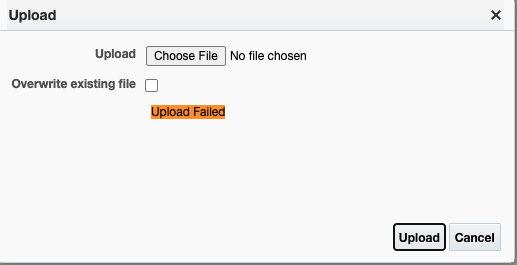
After the 26C update, deploying the extension’s BI Publisher package started to fail. Uploading the .xdrz archive into /Shared Folders/Custom from /xmlpserver stopped with nothing more than an orange “Upload Failed” in the Upload dialog. No reason, no log entry.
To find the cause, we opened the RunSQL data model in the Data Model editor and clicked OK on its data set. That surfaced the real error:
SQLInjection Error: DML / DDL Operations not allowedSo BI Publisher now validates data model SQL whenever it is saved or uploaded. During an upload, the failure is reported only as the generic message.
Uploading the same content in the catalog archive format through /analytics still worked. But a workaround that sidesteps a security check is not a fix, and we did not want our customers to depend on one.
Tip: if a BI Publisher upload fails with no explanation, open the data model in the editor and re-apply each data set. The real validation error shows up there.
Root cause
To give readable error messages, the RunSQL data model pre-parsed each query before running it:
db := dbms_sql.open_cursor;
dbms_sql.parse(db, q, dbms_sql.native);That looks harmless, but DBMS_SQL.PARSE executes DDL statements at parse time, as Oracle documents. From BI Publisher’s point of view, any DBMS_SQL reference is a way to run DDL from a report, and that is exactly what the new check blocks. In our testing, even a lone dbms_sql.open_cursor was enough to trigger it.
Takeaway for your own reports: if you maintain custom BI Publisher data models with PL/SQL in WITH FUNCTION blocks, search them for DBMS_SQL before your next upload or migration. WITH FUNCTION, OPEN cursor FOR dynamic SQL and DBMS_XMLGEN all still pass the check.
How we fixed it
We removed the pre-parse and handle errors where they actually happen: when the cursor is opened (parse errors) and when rows are fetched (runtime errors). Either way, the report returns a single Error row instead of failing:
begin
  open cur for q;
  lc := dbms_xmlgen.newcontext(cur);
  dbms_xmlgen.setnullhandling(lc, dbms_xmlgen.null_attr);
  dbms_xmlgen.setmaxrows(lc, &SQLROWS);
  res := dbms_xmlgen.getxmltype(lc);
  dbms_xmlgen.closecontext(lc);
exception when others then
  err := sqlerrm;
  if cur%isopen then close cur; end if;
  open cur for 'select :1 "Error" from dual' using err;
  ...
end;What changes for you:
- Errors come back as rows. Errors such as
ORA-00904(invalid identifier) and errors that only appear while rows are read, such asORA-01722(invalid number), now show up as an Error row in the results grid. Before, a failed report gave you nothing useful to read. - A smaller package. It now contains only the RunSQL report and data model that the extension actually uses.
What else is new in 3.1 – 3.3
- Paged results are back: 5 / 10 / 25 / 50 / All rows per page (your choice is remembered), First / Previous / Next / Last navigation, and a “Showing x to y of z entries” summary.
- Search in results: filter the fetched rows across all columns. Sorting and Export To Excel follow what you have filtered and sorted.
- Records Fetched: the results header now shows how many records came back, next to the execution time.
- Custom Max Records: choose Custom… in the Max Records list and type any limit (for example 75,000). The 10 – 5,000 presets are still there.
- Display fix: emoji and special characters in the UI no longer show as garbled text.
How to update
- Extension: Chrome updates it automatically from the Chrome Web Store. The version number shows in the extension’s toolbar.
- BI Publisher package (required): open the extension’s installation instructions and download
CidUtils.xdrz. In each environment, sign in to/xmlpserver, go to Shared Folders → Custom, click Upload, select the file and tick Overwrite existing file. With 3.3.0 the upload succeeds on 26C. - Best practice: after uploading, review who can access
/Custom/CidUtils. RunSQL is a developer tool, so limit it to your developer or analyst roles, especially in production.
Our commitment
CID Fusion Query is free, and we use it every day on our own projects. When Oracle tightens security, we do not look for a way around it. We find out why the check exists and change our tool to comply. Version 3.3.0 is the result.
New Fusion release breaking something?
Every quarterly Fusion update can tighten security, change behavior or retire something your reports, integrations and extensions depend on, just as 26C did with BI Publisher. If a new release catches you out, we would be glad to help: we find the root cause, fix it the right way and keep the fix upgrade-safe. Reach out at info@cidsolutions.com or on WhatsApp, and let’s get it solved.
Related posts
- CID Fusion Query v3.0.0 — Free Chrome Extension for Oracle Fusion Developers and Business Analysts
- OIC: Passwordless connections for Fusion BI Publisher — why SOAP is the last holdout, and the CID adapter that closes the gap
- Fusion AI Agent Studio: Run SQL directly from an agent by using an Application Composer Business Object Function