Difficulty: Intermediate
Series — ESS output retrieval (part 1)
Earlier, same technique family: OIC: minimize impact for online users by utilization of ESS job for running BIP queries (Aug 2023, XML from the ESS result ZIP) · Utilize Visual Builder Studio To Streamline File Upload, ESS Submission and Output Download (Jan 2026, the same three retrieval calls from VB Studio). This post brings the retrieval into OIC and adds the integration use case: email the templated PDF.
TL;DR
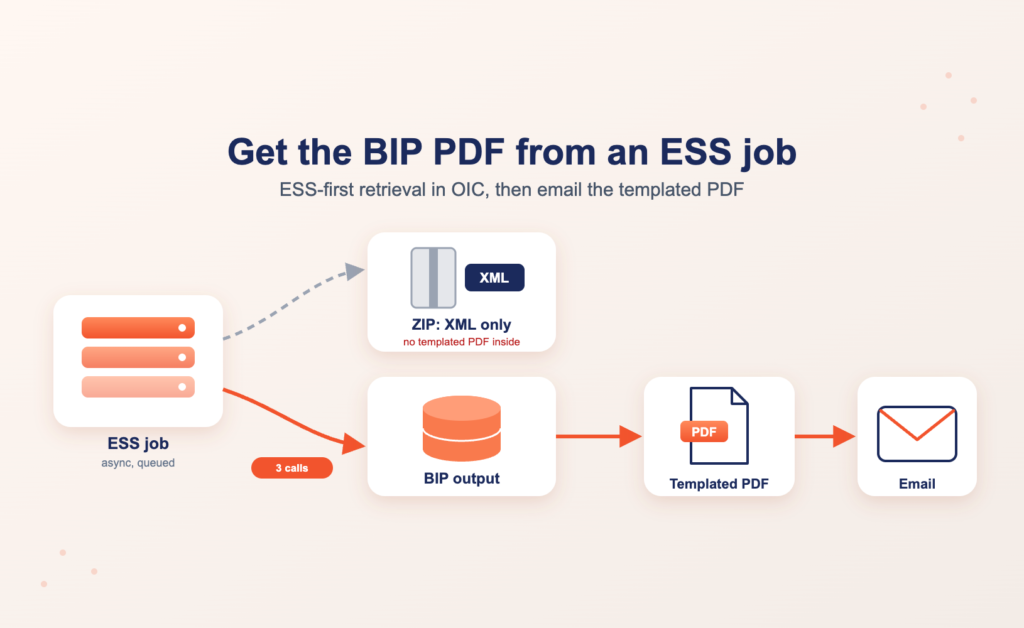
Problem: In our tests on Fusion 26C, the BIP PDF output of an ESS job was not in the ESS result ZIP. An ESS job that runs a BIP report with a template returned a ZIP that contained the XML but not the templated PDF. The PDF stayed on the BIP side.
Solution: After the ESS job completes, read the BIP job ID from the ESS request, ask BIP for the output ID of that job, and download the BIP PDF output by output ID. Three calls, and no online, synchronous report execution from the integration.
Who should read: OIC integration developers who must send or process the formatted BIP document, for example as an email attachment, and want to keep our ESS-first approach.
Tested on / Prerequisites
Tested on Fusion 26C · OIC 26.10 · BIP job type with a template and PDF output · an OIC connection to Fusion that is a generic REST connection, sending the XML or JSON payloads shown below · a Fusion user with access to the ESS request and to the BIP schedule-report service.
Related patterns on this blog
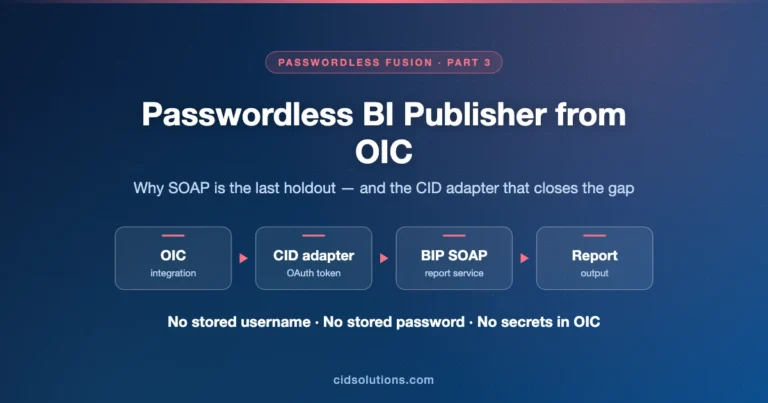
Submitting an ESS job and polling for completion is covered in Overcome Groovy Execution Limits by Submitting OIC Integration Through ESS Job and VB AppUIs: submit an ESS job with printer and BIP template. For the connection side, see OIC: Passwordless connections for Fusion BI Publisher, which exposes the same ScheduleReportWSSService operations through a custom adapter.
Business Challenge
A requirement that comes up again and again in our integrations: an OIC flow, driven by its own logic, must produce a formatted Fusion document and send it by email. A typical shape is an integration that runs on an event or a schedule, applies business rules to decide whether a document is needed and who receives it, invokes the Fusion report, and emails the resulting PDF to the recipients the logic selected. The document, such as a packing slip or an invoice, is produced by a BIP report with a template.
Our approach at CID is to invoke the report as an asynchronous ESS job, as we showed in our 2023 post on ESS jobs for BIP queries. The alternative is a direct call to the BIP report-execution SOAP services (the ExternalReportWSSService endpoint our Aug 2026 post uses).
These services can return the PDF, but it is an online call: the report executes on the BIP layer while the integration waits on the connection for the result. That is the pattern we avoid. With ESS the report is queued and scheduled like any other Fusion job, the integration submits and polls instead of holding a connection open for the whole report run, and a long report cannot hit the timeout of an online call.
To be precise, the report still executes in BI Publisher: the ESS BIP job type hands it to the BIP scheduler, as the bip.status_url parameter in Step 1 shows. The gain is an asynchronous, queued execution instead of an online one, not the removal of BIP from the picture.
ESS has one catch. If the integration only needs data, the flow is simple: submit the ESS job, wait for completion, download the result ZIP, and extract the XML. When the ESS job is a BIP job with a template, the ZIP we downloaded contained the XML but not the BIP PDF output. The formatted output exists, but in our tests it was held on the BIP side and was not returned in the ZIP. The rest of this post closes that gap and delivers the BIP PDF output without going back to the synchronous call.
Our Solution
In the email use case, the flow looks like this: the integration applies its logic and submits the ESS job, waits for it to complete, retrieves the BIP PDF output as described below, and then sends the email with the PDF attached. The picture shows the whole flow, including the ZIP that holds only the XML.
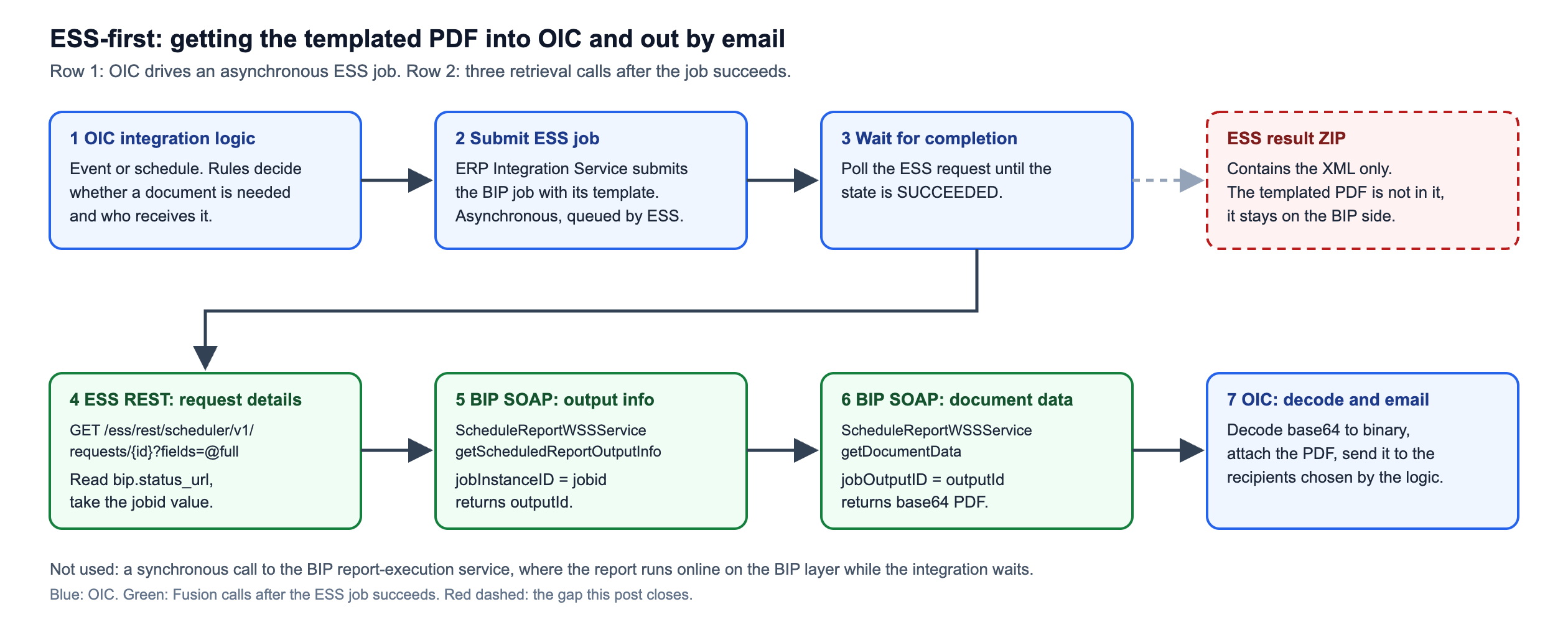
The PDF is retrieved in three calls after the ESS job completes:
- Read the ESS request with ESS REST and calculate the BIP job ID from the bip.status_url request parameter.
- Call the BIP SOAP operation getScheduledReportOutputInfo with that job ID to get the BIP output ID.
- Call the BIP SOAP operation getDocumentData with the output ID. The PDF comes back base64 encoded; OIC decodes it.
Implementation Details
Why the ZIP had no BIP PDF output in our tests
The result package for an ESS request is available through the ERP Integrations REST service, finder ESSJobExecutionDetailsRF with fileType=All.
GET {env_url}/fscmRestApi/resources/latest/erpintegrations?finder=ESSJobExecutionDetailsRF;requestId=4836273,fileType=All
REST-Framework-Version: 9For the BIP job in our test, the ESS request parameters show how the outputs are mapped (Program.FMG is L.XML,O.PDF and defaultOutputExtension is pdf), yet the ZIP we downloaded carried only the XML. We therefore go to BIP directly for the PDF.
Step 1: Calculate the BIP job ID from the ESS request
Request the ESS request details with the ESS REST requests/{requestId} endpoint. Oracle documents fields as a comma-separated list; we passed @full, which worked in our tests but is not in that reference, so request the requestParameters field explicitly if you prefer to stay on documented syntax:
GET {env_url}/ess/rest/scheduler/v1/requests/4836273?fields=@full
REST-Framework-Version: 9The response is long. The parameter names inside the array are not documented by Oracle; we observed the entry below for this job type. The relevant part is the requestParameters array, which includes an entry named bip.status_url. The excerpt below keeps only the fields that matter (host and IDs are mock values):
{
  "requestId": 4836273,
  "state": "SUCCEEDED",
  "jobType": "JobType://oracle/as/ess/ext/BIPJobType",
  "requestParameters": [
    { "name": "Program.FMG", "paramType": "STRING", "value": "L.XML,O.PDF" },
    { "name": "defaultOutputExtension", "paramType": "STRING", "value": "pdf" },
    { "name": "outputOverrideParameter", "paramType": "STRING", "value": "877106" },
    {
      "name": "bip.status_url",
      "paramType": "STRING",
      "value": "https://<pod>.fa.ocs.oraclecloud.com:443/xmlpserver/schedule/historyDetails.jsp?jobid=877106"
    }
  ]
}This is observed behavior, not a documented contract, so keep the parsing in one place. The BIP job ID is the value of the jobid query parameter at the end of that URL. In OIC, take the text after jobid= in that value, for example with this XPath expression:
substring-after($bipStatusUrl, "jobid=")In our sample the same value also appears in the outputOverrideParameter entry of requestParameters. We read the job ID from bip.status_url.
Step 2: Calculate the BIP output ID
Call /xmlpserver/services/ScheduleReportWSSService with the job ID as jobInstanceID. The operation is documented as getScheduledReportOutputInfo in the BI Publisher schedule service reference (the page we found sits in the Analytics Cloud documentation set; the WSS service path is the Fusion-hosted variant we used):
<soap:Envelope xmlns:soap="http://www.w3.org/2003/05/soap-envelope" xmlns:sch="http://xmlns.oracle.com/oxp/service/ScheduleReportService">
   <soap:Header/>
   <soap:Body>
      <sch:getScheduledReportOutputInfo>
         <jobInstanceID>877106</jobInstanceID>
      </sch:getScheduledReportOutputInfo>
   </soap:Body>
</soap:Envelope>The response contains a jobOutputList element. The fields we use are outputId, plus status, documentDataAvailable, documentDataMIMEType and documentDataCompressed as guards before the download:
<jobOutputList>
    <created>2026-10-23T13:12:01.885Z</created>
    <deleted>false</deleted>
    <documentDataAvailable>true</documentDataAvailable>
    <documentDataCompressed>false</documentDataCompressed>
    <documentDataContentType>pdf</documentDataContentType>
    <documentDataFileExtension>.pdf</documentDataFileExtension>
    <documentDataMIMEType>application/pdf</documentDataMIMEType>
    <jobId>877107</jobId>
    <outputId>836273</outputId>
    <outputName>4836273</outputName>
    <status>Success</status>
    <templateName>[Template Name]</templateName>
</jobOutputList>Step 3: Download the BIP PDF output
Call the same service with getDocumentData and the outputId as jobOutputID:
<soap:Envelope xmlns:soap="http://www.w3.org/2003/05/soap-envelope" xmlns:sch="http://xmlns.oracle.com/oxp/service/ScheduleReportService">
   <soap:Header/>
   <soap:Body>
      <sch:getDocumentData>
         <jobOutputID>836273</jobOutputID>
      </sch:getDocumentData>
   </soap:Body>
</soap:Envelope>The response holds the document as base64 text in the getDocumentData element (truncated here):
<env:Envelope xmlns:env="http://www.w3.org/2003/05/soap-envelope">
    <env:Header/>
    <env:Body>
        <ns3:getDocumentDataResponse xmlns="" xmlns:ns3="http://xmlns.oracle.com/oxp/service/ScheduleReportService">
            <getDocumentData>JVBERi0...[base64 PDF content truncated]</getDocumentData>
        </ns3:getDocumentDataResponse>
    </env:Body>
</env:Envelope>In OIC, decode that value to binary and attach the BIP PDF output to the email.
Postman collection
We keep the four requests in a Postman collection that contains sample values only. Import it, set the collection variables env_url, username and password, and replace the sample request ID, job ID and output ID with your own. Keep real credentials in a Postman environment or vault, not in the exported collection file, and use a dedicated low-privilege integration user. Download: ESS PDF Output Postman collection (JSON).
Gotchas / Production notes
- BIP still runs the report. ESS queues and schedules the job, but the BIP scheduler executes it. What we remove is the online, synchronous report call from the integration. Steps 2 and 3 are SOAP calls to BIP, but they only read metadata and download an output that already exists; they do not run the report.
- Documented versus observed. Documented: the ESS REST request endpoint with its
requestParametersarray, and the BIP schedule service operationsgetScheduledReportOutputInfoandgetDocumentData. Observed on our tested environment and not documented by Oracle: thebip.status_urlparameter name, thejobidquery parameter inside it, the@fullvalue forfields, and the BIP PDF output being absent from the result ZIP. Retest after each Fusion update. - Our tested job is one configuration. The BIP job type, template and output format are project configuration. A different output setting or a custom ESS wrapper job may behave differently, so verify with your own job before relying on this.
- Security. The Postman collection uses basic authentication; in OIC keep credentials in the connection, not in the integration. Use a least-privilege integration user, rotate its password on your normal schedule, and do not log or track the base64 payload, because the PDF may contain personal or financial data. BIP keeps the generated output until its retention purge, so it stays available to anyone with access to the job history.
- The job ID in the response differs from the one you sent. We sent
jobInstanceID877106 and the response containedjobId877107. We did not rely onjobId; theoutputIdis what Step 3 needs. jobOutputListcan contain more than one output. Our test returned one. If a report produces several outputs, select bydocumentDataMIMETypeandstatusrather than taking the first element.- Check
statusisSuccessanddocumentDataAvailableistruebefore calling getDocumentData; do not call it blind. - Base64 inflates the payload. A large BIP PDF output arrives as a large SOAP response inside OIC; test with your biggest real document and check the payload limits of your OIC instance.
- Headers. Our Postman collection sends REST-Framework-Version: 9 on all four requests, including the SOAP calls. The SOAP calls use
Content-Type: application/soap+xml;charset=UTF-8. We have not tested whether the version header is needed on the SOAP calls. - Connection type. The calls above were tested with the generic REST connection described in Prerequisites. If your connection URL must survive Production-to-Test cloning, see our P2T-safe pattern post.
How to verify
- The decoded BIP PDF output starts with
%PDF-; in base64 the text begins withJVBERi0. - The
outputNamein the getScheduledReportOutputInfo response equals the ESS request ID you started from. - Open bip.status_url in a browser as a user with BIP access: the BIP history page for that job lists the same output, and the document should match what OIC received.
- In OIC Monitoring, check the instance tracking for the decoded payload size and for any fault on the SOAP invoke.
Conclusion
With these three calls, an OIC flow gets the BIP PDF output of an ESS-launched job and can email it or pass it on, keeping the asynchronous ESS-first approach and avoiding an online call to the BIP report-execution service. The trade-off is that the retrieval relies on observed behavior of the BIP job type, so treat it as a pattern to retest on each Fusion update rather than a contract.
Want this in your environment?
Need an OIC integration that runs a Fusion BIP report through ESS and delivers the BIP PDF output by email, without an online report call on the BIP layer? We’ve shipped this pattern at multiple enterprise clients and we can do the same for you. Reach out at info@cidsolutions.com or WhatsApp — let’s get it solved.
Related posts
- OIC: minimize impact for online users by utilization of ESS job for running BIP queries
- Utilize Visual Builder Studio To Streamline File Upload, ESS Submission and Output Download
- OIC: Passwordless connections for Fusion BI Publisher
- Fusion Apps: Submit Asynchronous OIC Integrations by Using Custom Object Integration Events