Difficulty: Beginner
TL;DR
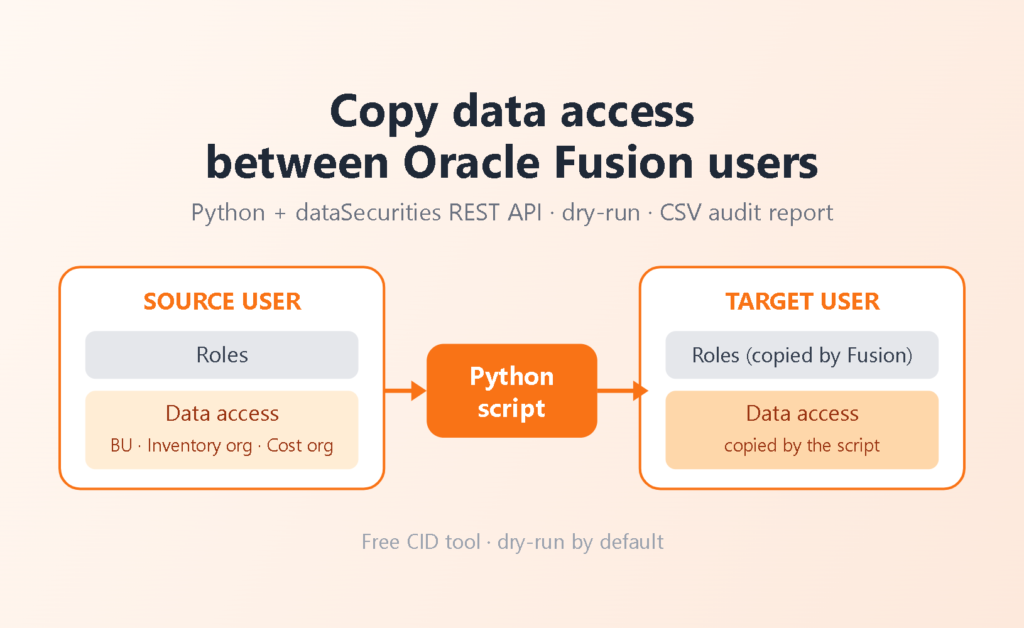
Problem: Fusion can create a user and copy all roles from another user, but it does not copy data access (business unit, inventory organization, cost organization). After a P2T refresh, every new development or test user needs that access rebuilt by hand.
Solution: A free Python script to copy data access reads the source user’s assignments from the dataSecurities REST resource and creates the missing ones for the target user. It is dry-run by default, idempotent, and writes a CSV audit report of every decision.
Who should read: Fusion security administrators, implementation consultants and DevOps engineers who need to copy data access when they refresh DEV and TEST environments and create test users.
Tested on / Prerequisites
Tested on Fusion 26C in a DEV environment, where the script added the missing inventory organization data access · Python 3.15.2 (the script requires 3.9 or later) · a calling user allowed to manage data security for users (we have not confirmed the exact privilege name) · the target user already holds the same roles as the source user (see Gotchas).
Related patterns on this blog
The script keeps the environment host and credentials outside the code, in the spirit of our P2T-safe pattern for VB AppUIs. For the credential side of integrations, see OIC: Passwordless connections for Fusion BI Publisher.
Business Challenge
After a Production-to-Test (P2T) refresh, DEV and TEST carry production’s configuration, and the implementation team creates its own development and test users. Fusion makes the first half easy: create the user, copy all roles from an existing user. What it does not copy is the data access attached to those roles, so teams must copy data access separately: meaning the business units, inventory organizations, cost organizations and other security contexts each role is limited to.
The result is a user who has the right roles and still sees nothing, or cannot transact in the right organization. Someone then has to copy data access manually, role by role and context by context. It is slow, it is easy to miss a row, and it repeats for every new user and every P2T. We have run into this often enough that we stopped doing it by hand. In our DEV test we first copied the roles to the new user, then ran the script instead of opening the data access screen and adding each row manually. The CSV report also gave us a clear record of what was done.
Our Solution
We wrote a small script to copy data access, now published as a free repository: fusion-copy-data-access. It works against the Fusion REST resource /fscmRestApi/resources/latest/dataSecurities, which exposes data assignments per user and role.
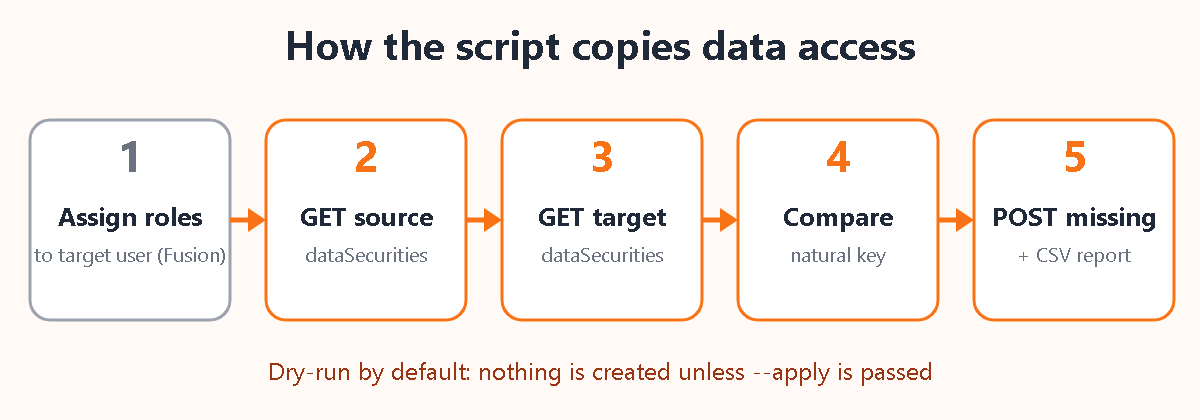
- Assign the same roles to the target user. Oracle’s create operation does not grant the role.
- Read every data assignment of the source user, paged.
- Read every data assignment of the target user once.
- Compare on a natural key (role, security context, up to three context values). Skip what the target already has and, by default, skip inactive source rows.
- In
--applymode, POST each missing assignment for the target user. - Write a CSV report with the decision for every source row.
To copy data access safely, nothing is written unless you pass --apply. The same Oracle reference pages describe both operations: Get all data assignments by user and role and Create a data assignment for a user (25D reference).
Implementation Details
Install and configure the script
Create a virtual environment, install the requirements and copy the example environment file. Host, user and API version come from .env or arguments, never from the code. The password is not stored: the script reads FUSION_PASSWORD if set, otherwise it prompts.
# Windows PowerShell: py -3 -m venv .venv ; .\.venv\Scripts\Activate.ps1
# Linux / macOS:
cd fusion-copy-data-access
python3 -m venv .venv
source .venv/bin/activate
python -m pip install --upgrade pip
pip install -r requirements.txt
cp .env.example .env # then edit .envFUSION_BASE_URL=https://your-pod.fa.ocs.oraclecloud.com
FUSION_USER=your.admin.user
# Leave FUSION_PASSWORD unset to be prompted interactively (recommended).
FUSION_API_VERSION=latestCopy data access: dry-run first, then apply
# 1) Dry-run: shows what WOULD be created, writes the CSV report
python copy_data_access.py --source-user JOHN.SMITH --target-user JANE.DOE

# 2) Review the CSV, then apply
python copy_data_access.py --source-user JOHN.SMITH --target-user JANE.DOE --apply

# Only specific roles
python copy_data_access.py --source-user JOHN.SMITH --target-user JANE.DOE --role ORA_INV_INVENTORY_MANAGER_JOB --applyThe dry-run reads both users and writes the report, so you can review exactly what would be created before anything changes. Options: --include-inactive, --use-finder, --api-version, --report and -v. The exit code is 0 on success, 1 if at least one POST failed, 2 on a read error.
How to copy data access: reading the source user
To copy data access, each user is read with a paged GET on dataSecurities, filtered by user name and ordered by UserRoleDataAssignmentId. If the q filter returns nothing for a user you know exists, --use-finder switches to the ManageDataAccessRF finder instead.
GET {base_url}/fscmRestApi/resources/latest/dataSecurities?onlyData=true&limit=100&offset=0&fields=UserRoleDataAssignmentId,UserName,RoleCommonName,RoleNameCr,SecurityContext,SecurityContextValue,SecurityContextValue2,SecurityContextValue3,ActiveFlag&orderBy=UserRoleDataAssignmentId:asc&q=UserName='JOHN.SMITH'Idempotency: the natural key
The user-specific ID is system generated, so it cannot be compared across users. The script compares the role, the security context and the three context values, so a rerun that tries to copy data access again creates nothing that already exists.
def role_key(item: dict) -> str:
    """Technical role name preferred; fall back to the display role name."""
    return (item.get("RoleCommonName") or item.get("RoleNameCr") or "").strip()


def identity(item: dict) -> tuple:
    """Natural key of an assignment, independent of the user."""
    return (
        role_key(item).lower(),
        (item.get("SecurityContext") or "").strip().lower(),
        (item.get("SecurityContextValue") or "").strip(),
        (item.get("SecurityContextValue2") or "").strip(),
        (item.get("SecurityContextValue3") or "").strip(),
)What gets created when you copy data access
For each missing row the script posts only the copyable fields, with the target user name. It sends one role identifier, the technical name when present.
{
  "UserName": "JANE.DOE",
  "RoleCommonName": "ORA_INV_INVENTORY_MANAGER_JOB",
  "SecurityContext": "Inventory organization",
  "SecurityContextValue": "XX1",
  "ActiveFlag": true
}The audit report
Every source row lands in the CSV with one of five statuses: COPY (dry-run only, would be created), CREATED, SKIP_EXISTS (the target already has it), SKIP_INACTIVE and FAILED (with the HTTP status and a short response excerpt). The report is written as UTF-8 with a BOM, so non-Latin organization names open correctly in Excel. Excerpt, anonymized:
status,role,security_context,value1,value2,value3,source_assignment_id,detail
CREATED,ORA_INV_INVENTORY_MANAGER_JOB,Inventory organization,XX1,,,300000000000001,
SKIP_EXISTS,ORA_INV_INVENTORY_MANAGER_JOB,Inventory organization,XX2,,,300000000000002,
CREATED,ORA_PO_PROCUREMENT_MANAGER_JOB,Business unit,XX Business Unit,,,300000000000003,
SKIP_INACTIVE,ORA_PO_PROCUREMENT_APPLICATION_ADMIN_JOB,Business unit,XX Business Unit,,,300000000000004,
CREATED,ORA_CST_COST_ACCOUNTANT_JOB,Cost organization,XX Cost Organization,,,300000000000005,Gotchas / Production notes
- Roles first. Oracle documents that the role must be assigned to the user separately. If the target does not hold the role yet, the POST fails for that row. Assign the roles and let role synchronization finish before
--apply. - The dry-run does not check the target’s roles. The script compares data access only. A row can show
COPYin the dry-run and still end asFAILEDif the role is missing on the target. - Existing rows match on the key, not on
ActiveFlag. If the target has the same assignment but inactive, the row is reported asSKIP_EXISTSand is not reactivated. - Inactive source rows are skipped by default. Pass
--include-inactiveonly if you really want them on the new user. - Failed POSTs are never retried automatically. Only GET is retried, so a timeout cannot produce a duplicate. Rerun after fixing the cause; the idempotent comparison skips what was already created.
- It will copy data access, not roles, and not HCM. HCM security profiles are a different mechanism and are not handled. There is also no DELETE option, by design: the source user’s access is never removed.
- The report records the source assignment ID, not the new one. It tells you what was created, not the IDs Fusion generated for the target.
- One environment, one
.env. Never copy a PRODUCTION.envinto the DEV or TEST working folder. After P2T the host changes; the script follows the file you give it. - Content-Type and
qquoting. The POST defaults toapplication/vnd.oracle.adf.resourceitem+json, the value in Oracle’s example; override with--content-typeif your environment needsapplication/json. The script as shipped, with the defaultqfilter and this default Content-Type, worked in our test on Fusion 26C. - API version. The default is
latest. Pin a version such as11.13.xx.xxper environment if behaviour changes after an update. Our test used the defaultlatest. - Use a dedicated least-privilege admin user. The password is never accepted on the command line and never logged. Keep the CSV out of git; the repository’s
.gitignorealready does. - Data access is a security control. Copying it gives the target user everything the source user can see, so choose the source user deliberately and get your security owner’s approval for the template user. We use it for DEV and TEST users; in PRODUCTION treat it as a security change under your normal approval process, and keep the CSV report as the evidence of what was granted.
- Keep TLS verification on. The script verifies certificates by default. The
--insecureoption exists for lab use only; never use it against a real environment.
How to verify
- Open the CSV and check there is no
FAILEDrow. The process exit code should be0. - After you copy data access, run the same command again without
--apply. A clean copy shows onlySKIP_EXISTSandSKIP_INACTIVE, and noCOPYrows. - In Fusion, go to the data access screen of the target user, check that the access rows were added and compare them with the source user\u2019s.
- Log in as the target user and open a transaction in one of the copied business units or inventory organizations.
Conclusion
A new DEV or TEST user now takes a dry-run, a review and one command to copy data access from the source user, with an audit trail of every row. The work that used to be repeated by hand after every P2T becomes a repeatable, reviewable step.
Full code: the complete script, README and example configuration can be downloaded freely from gitlab.cidsolutions.co.il/cid-public/fusion-copy-data-access.
Want this in your environment?
Facing a similar challenge in your Fusion environment, whether you need to copy data access after P2T or want a wider security automation? We can implement it for you. Reach out at info@cidsolutions.com or WhatsApp — let’s get it solved.