General
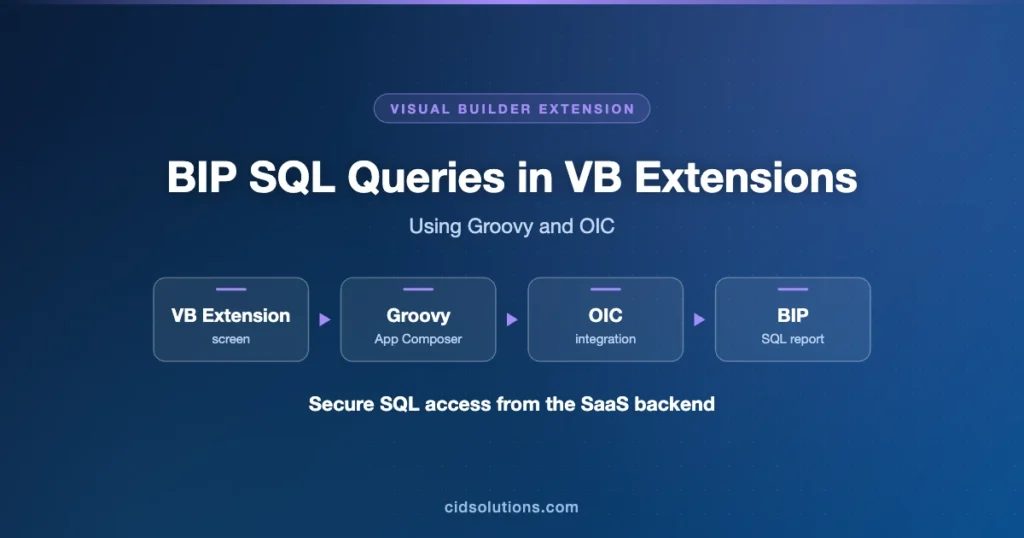
Using of OIC for exposing BIP reports to Visual Builder Application is a quite common approach. However when we develop SaaS extensions we have only access to SaaS backend and there is no secure way (at least up until today) to create a connection to an OIC instance.
According to VBCS blog, the ability to add local server connection in Visual Builder Studio will provide solution for this need.
Meanwhile we can implement the workaround by using Application Composer Groovy scripting, OIC and BIP.
Use Case
A VBCS SaaS Extension screen should display a table with results brought by a complex SQL query.
Implementation Details
This following solution extends similar approach of using Groovy that was described in https://cidsolutions.com/2023/12/01/visual-builder-extension-for-fusion-saas-creating-complex-queries-with-application-composer-groovy-methods/.
- Create a REST OIC Integration that is invoked by POST method to allow passing multiple parameters to the query.

- Define JSON payload for multiple optional parameters to be passed.

- Define response payload as array of records.
- Use standard ExternalReportWSSService to run the report and convert the XML result to JSON by using staging file.
- Define a WebService connection in Application Composer, specify POST method and samples for input and response payloads.

- Similar to the previous post, define an externally callable method, in our case under Subscription object.

- Call the integration, parse the results and return response in a declared format
java.util.List<java.util.Map<java.lang.String,java.lang.String>>.
- Define connection to the method above in Visual Builder Studio.

- If using SDP – customize the fetch chain to allow proper Content-Type passing as required by Fusion.

- Implement the rest of required features.