General
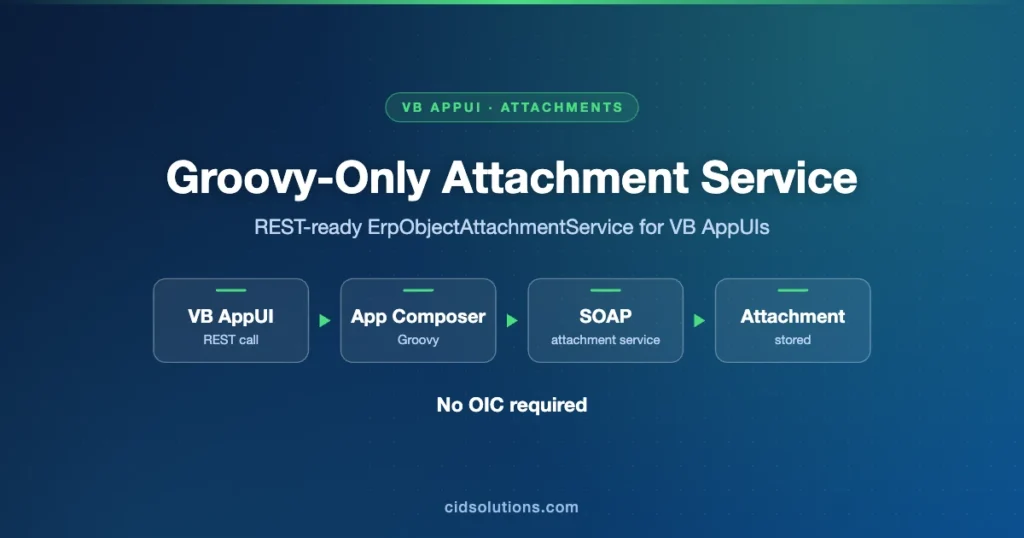
This post further extends the solution of exposing Visual Builder AppUI ready REST APIs on Fusion backend for business entities that do not have such REST APIs out-of-the-box.
The previous post used Application Composer, Custom Object, Groovy and OIC.
The solution below uses Groovy-only implementation leveraging internal URL https://fa-internal.oracleoutsourcing.com:10663 and SOAP based ErpObjectAttachmentService.
Such a solution can be deployed to PROD and will work without any changes in lower environments after P2T process.
Similar approach is also described in https://cidsolutions.com/2024/11/03/fusion-saas-implement-p2t-hassle-free-generic-sql-query-rest-utility-for-vb-appuis-by-using-bip-and-app-composer/
Implementation Details
- Use sandbox with Application Composer to define Web Service connection for SOAP service ErpObjectAttachmentService by pointing it to the following URL:
https://fa-internal.oracleoutsourcing.com:10663/fscmService/ErpObjectAttachmentService?wsdl
- Extend the Rest Util custom object by adding 2 methods – downloadAttachmentFile and uploadAttachmentFile

- Download function – marked Callable by External Systems:

def attachmentRequest = [ EntityName : EntityName, CategoryName: CategoryName, UserKeyA: UserKeyA, UserKeyB: UserKeyB, UserKeyC: UserKeyC, UserKeyD: UserKeyD, UserKeyE: UserKeyE ]; def appParams = ''; def result = [:] try { def res = adf.webServices.LocalAttachmentService.downloadAttachment(attachmentRequest, appParams); if (res?.FileName) result.fileName = res.FileName if (res?.AttachmentContent) result.attachmentContent = res.AttachmentContent } catch (e) { } return result - Upload function – marked Callable by External Systems:

def result = [:]
def attachmentRows =
[[
  UserKeyA: UserKeyA,
  UserKeyB: UserKeyB,
  UserKeyC: UserKeyC,
  UserKeyD: UserKeyD,
  UserKeyE: UserKeyE,
  AttachmentType: "File",
  Title: Title,
  Content: Content,
]]

def res = adf.webServices.LocalAttachmentService.uploadAttachment(entityName, categoryName, "Yes", attachmentRows)
result = res
- Use the methods above inside JavaScript action chains.
Download:
Upload:
Table of Contents